How to Measure a TV: The Right Way to Find Screen Size, Width, Height, and Depth
Buying a new TV sounds simple until you realize the number on the box doesn’t tell you how much space the television actually needs. Many people assume a 65-inch TV is 65 inches wide, only to discover it won’t fit on their TV stand, inside a cabinet, or on the wall they planned to use. That often leads to unnecessary returns, extra costs, or having to rearrange an entire room.
I’ve seen this mistake happen repeatedly because manufacturers advertise the diagonal screen size, while the measurements that matter for installation are the TV’s actual width, height, and depth. Even a small difference of a few inches can determine whether a television fits properly or not.
The good news is that measuring a TV is straightforward once you know what to measure. Whether you’re buying a new television, replacing an older model, choosing a wall mount, or checking if your current TV will fit in a different space, a few accurate measurements can save time, money, and frustration.
In this guide, you’ll learn exactly how to measure a TV, understand the difference between screen size and overall dimensions, and avoid the common mistakes that catch many buyers by surprise.
Why Screen Size Isn’t Just a Number
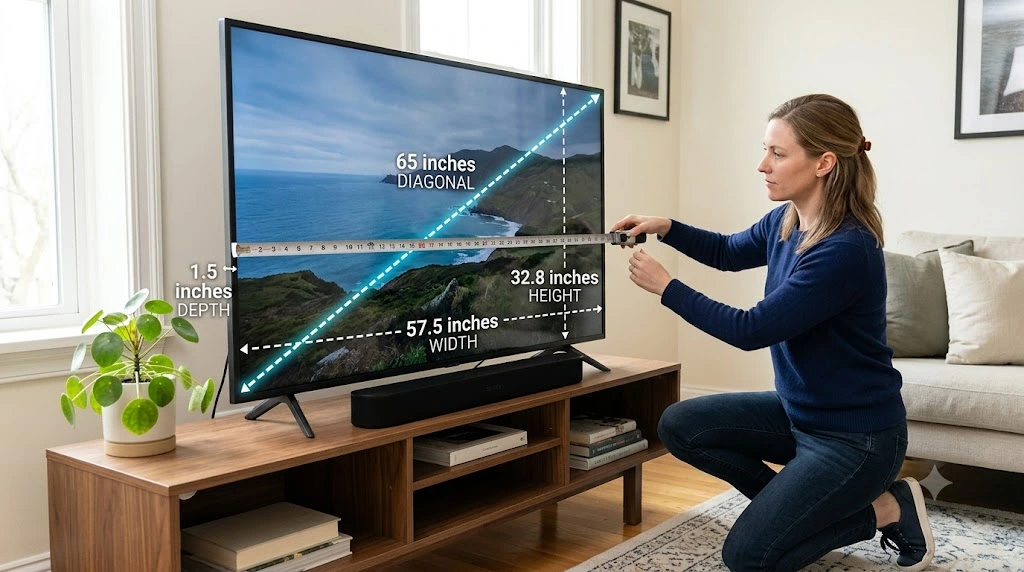
When you shop for a television, the size listed in the product name refers only to the visible screen – it doesn’t include the bezel, frame, or stand. A 65-inch TV, for example, has a screen that measures about 65 inches diagonally, yet the television itself is usually closer to 57 inches wide, depending on the model and bezel thickness.
This gap between screen size and actual size matters whenever you mount a TV on the wall, buy a stand or entertainment center, place a TV inside a cabinet, move or transport a television, or compare different models side by side. Understanding these measurements up front helps you choose a TV that genuinely fits both your room and your furniture.
Grasping the Basics of TV Measurements
Before picking up a tape measure, it helps to understand the four core measurements that describe any television.
If you’re planning to mount your TV or set up a home entertainment system, it’s also helpful to understand the basics of a wire gauge chart before running or extending cables through your setup.
Screen Size (Diagonal)
This is the advertised TV size, measured from one corner of the visible screen to the opposite corner. The bezel should never be included in this measurement. Common sizes include:
- 32-inch TV
- 43-inch TV
- 50-inch TV
- 55-inch TV
- 65-inch TV
- 75-inch TV
- 85-inch TV
Width
The width is the distance from the far left edge of the TV frame to the far right edge. This measurement tells you whether the television will actually fit on a stand, shelf, or cabinet.
Height
The height is measured from the bottom edge of the TV frame to the top edge. It becomes essential if you’re placing the TV inside furniture or mounting it beneath shelves, since it determines how much vertical clearance you need.
Depth
Depth measures the distance from the front of the TV to the back panel. Unless you specifically need the total depth with the stand attached, the tabletop stand shouldn’t be included in this figure.
How TV Manufacturers Measure Screen Size
TV manufacturers follow an industry standard when listing screen size. Rather than measuring width or height, they measure the visible display diagonally from one corner of the screen to the opposite corner, leaving the frame – also called the bezel – out of the equation entirely.
This method became the industry standard because it offers a consistent way to compare televisions across different brands. Since most modern TVs share a 16:9 aspect ratio, measuring diagonally lets shoppers compare screen sizes fairly even when the overall width and height vary slightly from model to model.
When shopping for a new TV, keep in mind that the advertised size refers only to the visible screen. If you need to know whether a TV will fit on a stand, inside a cabinet, or on a wall, check the product’s overall width, height, and depth in the manufacturer’s specifications. While the diagonal screen measurement stays consistent across brands, overall width, height, and thickness can still differ because manufacturers use different bezel designs, speaker placements, and cabinet construction.
Reference: Samsung, Sony, LG
How to Compare TV Diagonal Measurement With Horizontal Measurement
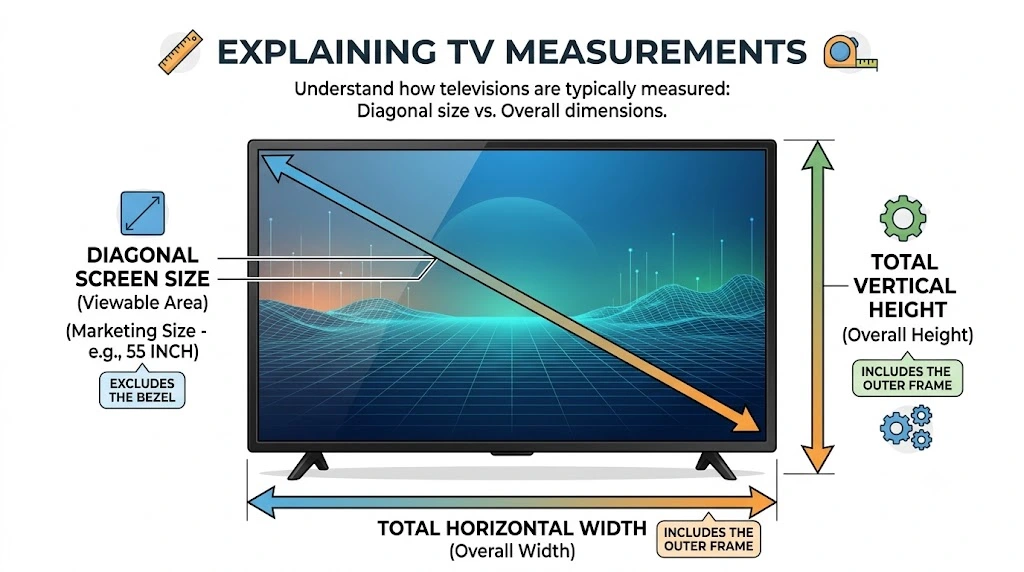
Many buyers confuse diagonal measurement with width. A TV advertised as 55 inches isn’t 55 inches wide – manufacturers measure diagonally because televisions come in different aspect ratios, and most modern TVs use a 16:9 ratio that creates a wide rectangular screen. Because of that shape, the width is always smaller than the diagonal measurement.
Here’s a simple comparison:
| Advertised TV Size | Approximate Width |
| 43 inches | 37.5 inches |
| 50 inches | 43.6 inches |
| 55 inches | 47.9 inches |
| 65 inches | 56.7 inches |
| 75 inches | 65.4 inches |
These figures can vary slightly between brands since bezel sizes differ from one manufacturer to the next.
How to Measure Your TV
Measuring a TV only takes a few minutes, and a standard tape measure is the easiest tool for the job. Before you begin, place the TV on a flat, stable surface if possible.
Keep these four rules in mind:
- TV size is measured diagonally across the visible screen.
- Overall width, height, and depth include the frame (bezel).
- Always compare the TV’s actual dimensions with your available space.
- Check the manufacturer’s specifications before buying a TV stand or wall mount.
Step 1: Measure the Diagonal of the Screen
Start at the top-left corner of the visible screen and stretch the tape measure diagonally to the bottom-right corner. Measure only the display area, and leave out the plastic or metal frame surrounding the screen. For example, roughly 43 inches indicates a 43-inch TV, roughly 55 inches indicates a 55-inch TV, and roughly 65 inches indicates a 65-inch TV. This is the exact measurement manufacturers use when naming TV sizes.
Step 2: Measure the TV Horizontal Width
Next, measure the overall width of the television by placing the tape measure at the outer edge of the left frame and extending it straight across to the outer edge of the right frame. Unlike the screen measurement, this time you should include the bezel, since the entire TV – not just the display – needs to fit on your furniture or wall.
Step 3: Measure the TV Height
Measure from the highest point of the frame to the lowest point. If the TV is sitting on its stand and you need the total installed height, measure with the stand attached. If you’re planning a wall mount instead, measure only the TV body unless your mount instructions specify otherwise.
Step 4: Measure the TV Depth
Finally, measure from the very front of the television to the back panel. Most modern LED, OLED, and QLED TVs are only a few inches thick, though some models run deeper than others depending on their internal design. If you’re placing the TV inside a cabinet, leave extra space behind it for cables and proper airflow.
How to Measure a Wall-Mounted TV
You can measure a wall-mounted TV without taking it down. Start by measuring the visible screen diagonally to confirm the advertised screen size, then measure the full width and height from the outer edges of the frame.
If you need the depth, measure from the front of the screen to the back of the TV where it meets the wall mount. Keep in mind that the wall bracket adds extra space between the TV and the wall, so it helps to measure both the television and the available wall clearance if you’re planning to replace or move it. For the most accurate results, use a flexible tape measure and ask another person to help hold it in place when measuring larger TVs.
Understanding Additional TV Dimensions
Knowing the screen size is only part of the process. Before you buy a TV stand, install a wall mount, or place the TV inside a cabinet, you should also know its full dimensions. These measurements help you avoid fitting problems and make installation far easier.
How to Measure a TV Before Buying a Stand or Cabinet
Before buying a new TV stand, cabinet, or entertainment center, measure the available space instead of relying on the advertised screen size. Compare the furniture’s inside width, height, and depth with the TV’s overall dimensions, including the bezel.
For the best fit, choose a TV stand that is at least as wide as the television. Many homeowners prefer a stand that extends several inches beyond each side of the TV for better stability and a more balanced look. If you’re placing the TV inside a cabinet, leave extra space around the sides and back for cables and proper ventilation.
Measuring a TV for Moving or Storage
If you’re moving to a new home or placing a TV in storage, measure the overall width, height, and depth of the television before packing it. If you still have the original box, check its dimensions too, since packaging is always larger than the TV itself. Accurate measurements make it much easier to choose the right moving box and ensure the TV fits safely inside your vehicle.
Screen Size vs. Overall TV Size
Many people assume these two measurements are the same, but they aren’t. A 65-inch TV, for example, refers only to the diagonal measurement of the visible display – the complete television, including the bezel, is usually much wider and taller than that number suggests.
Here’s a quick comparison:
| Measurement | What It Includes |
| Screen Size | Visible display only |
| TV Width | Entire TV frame from left to right |
| TV Height | Entire TV frame from top to bottom |
| TV Depth | Front of the TV to the back panel |
Understanding this difference helps you choose the right furniture and avoid installation issues down the line.
Optimal Viewing Distance
A TV shouldn’t just fit your room – it should also deliver a comfortable viewing experience. Sitting too close can cause eye fatigue, while sitting too far away makes it harder to enjoy picture quality. The ideal viewing distance depends largely on the size of your television:
| TV Size | Recommended Viewing Distance |
| 32-inch | 4–5 feet |
| 43-inch | 5.5–7 feet |
| 50-inch | 6–8 feet |
| 55-inch | 7–9 feet |
| 65-inch | 8–10 feet |
| 75-inch | 9–11 feet |
| 85-inch | 10–12 feet |
If you’re buying a 4K TV, you can usually sit a little closer without noticing individual pixels. Organizations such as the Society of Motion Picture and Television Engineers (SMPTE) and THX recommend choosing a viewing distance based on a comfortable field of view rather than relying on screen size alone. Personal preference still plays a role, but following these recommendations tends to create a more immersive viewing experience.
Tips to Match TV Size With Your Room
Choosing the right TV is about more than just the biggest screen you can afford. A few extra measurements before you buy can make a real difference.
Measure Your Viewing Distance
Measure the distance from your sofa or chair to the wall where the TV will be installed. This helps you choose a screen size that feels comfortable during long viewing sessions rather than straining your eyes.
Measure the Available Wall Space
Use a tape measure to check the width and height of the wall where the TV will go. Make sure there’s enough room around the TV for a balanced appearance, since many homeowners prefer leaving several inches of space on each side instead of placing the TV edge to edge.
Check Furniture Dimensions
If you’re using a TV stand or cabinet, measure its width, height, and depth. The stand should be wider than the television to provide better support and improved stability.
Measure Your Space Before Buying a New TV
If you’re shopping for a new television, measure the available wall or furniture space before placing an order, then compare those measurements with the TV’s overall width, height, and depth listed on the manufacturer’s product page. This helps you choose a model that fits comfortably without blocking shelves, windows, or speakers.
Don’t Forget to Check the Port and Mounting Positions
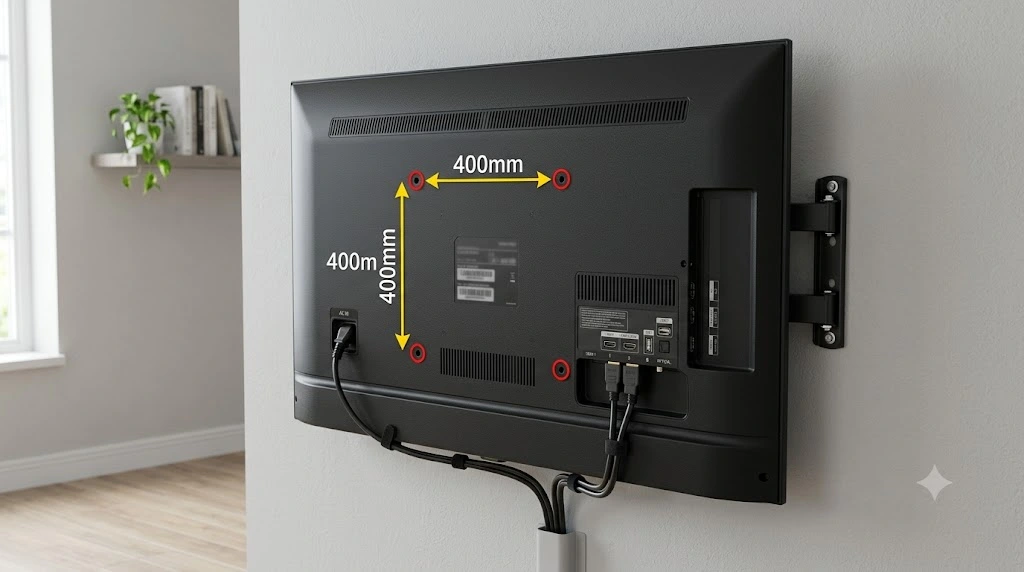
Many buyers only measure the front of the TV, but the back is just as important. Before mounting or placing your TV against a wall, check the location of the ports, including:
- HDMI ports
- USB ports
- Ethernet port
- Optical audio output
- Power connector
Make sure there’s enough room to plug in cables without bending or damaging them, and if you’re using a wall mount, confirm that the bracket doesn’t block access to important ports.
Check the VESA Mounting Pattern
Most modern TVs use a standard mounting system called VESA, which describes the distance between the mounting holes on the back of the TV. Before buying a wall mount, measure the distance between the horizontal mounting holes, measure the distance between the vertical mounting holes, and match these figures against the wall mount specifications.
Using the correct VESA pattern ensures the TV attaches securely to the bracket. Before installing a wall mount, check both the VESA pattern and the maximum weight the bracket can support, and follow the mounting instructions provided by both the TV and wall mount manufacturers for a secure installation.
Quick Measurement Checklist
Before buying or installing a television, run through this checklist:
- ✔ Measured the screen diagonally
- ✔ Measured the full TV width
- ✔ Measured the TV height
- ✔ Measured the TV depth
- ✔ Checked the available wall space
- ✔ Measured the TV stand or cabinet
- ✔ Confirmed the viewing distance
- ✔ Verified cable clearance
- ✔ Checked the VESA mounting pattern
- ✔ Compared the TV dimensions with the installation space
Taking a few extra minutes to measure everything can save time, money, and frustration later.
Common TV Measuring Mistakes
Measuring a TV is simple, but small mistakes can lead to big problems. A TV that doesn’t fit your stand, cabinet, or wall can be difficult to install and may require extra furniture or hardware.
Measuring the Entire TV Instead of the Screen
The advertised TV size refers only to the visible screen, so avoid measuring from one corner of the frame to the opposite corner. Instead, measure the display area from corner to corner.
Forgetting to Measure the Width
Many people only check the diagonal size, but the width is what actually determines whether the TV will fit on a stand, inside a cabinet, or on a wall. Always measure the full width before buying.
Ignoring the Bezel
The bezel is the frame around the screen, and even though modern TVs have thin bezels, they still affect the overall dimensions. Always include the bezel when measuring the TV’s width and height.
Not Checking the Depth
Slim TVs still need room behind them, so leave enough space for power cords, HDMI cables, and proper airflow.
Choosing a TV Stand That Is Too Small
A TV stand should be at least as wide as the television. A wider stand often provides better stability and creates a more balanced appearance.
Forgetting the Viewing Distance
A TV may fit your room physically but still feel uncomfortable if you sit too close or too far away, so measure your seating distance before deciding on a screen size.
Frequently Asked Questions
How do you measure a TV?
Measure the visible screen diagonally from one corner to the opposite corner, without including the bezel or frame.
Do you include the bezel when measuring a TV?
No – the advertised TV size only includes the visible display. However, you should include the bezel when measuring the TV’s total width and height for furniture or wall placement.
How do I know what size TV I have?
Measure the visible screen diagonally. If the diagonal measures about 55 inches, you have a 55-inch TV.
How wide is a 65-inch TV?
Most 65-inch TVs are approximately 57 inches (145 cm) wide, though the exact width may vary slightly depending on the manufacturer and bezel design.
How tall is a 55-inch TV?
A typical 55-inch TV is about 27 inches (69 cm) tall without the stand. Always check the manufacturer’s specifications for exact dimensions.
Can I measure a TV without a tape measure?
Yes – you can use a ruler, a yardstick, a measuring app on your smartphone, or a piece of string that you measure afterward. A tape measure is still the most accurate option.
Does the TV stand count in the measurements?
It depends on your purpose. If you’re checking whether the TV fits inside furniture, include the stand. If you’re mounting the TV on a wall, measure only the TV body.
What is the difference between TV size and TV dimensions?
TV size refers to the diagonal measurement of the visible screen, while TV dimensions refer to the overall width, height, and depth of the television, including the frame.
Why are TVs measured diagonally?
Manufacturers use the diagonal measurement because it provides a consistent way to compare screens with the same aspect ratio, and this method has been the industry standard for many years.
What tools do I need to measure a TV?
A flexible tape measure works best. It also helps to have a notepad, a pencil, and a level on hand if you plan to wall-mount the TV.
Conclusion
Measuring a TV takes only a few minutes, but it can prevent expensive mistakes later. The biggest lesson is to remember that the advertised screen size is only the diagonal measurement of the display. Before buying a television, wall mount, TV stand, or cabinet, always check the TV’s actual width, height, and depth against the available space.
One practical habit that’s worth following is measuring everything twice before making a purchase. It’s a simple step, but it’s one that helps avoid returns, installation problems, and the frustration of finding out a new TV doesn’t fit where you expected. Even experienced installers rely on actual measurements rather than assumptions because dimensions can vary slightly between manufacturers.
If you’re shopping for a new TV, compare your measurements with the manufacturer’s specifications before placing your order. A few minutes with a tape measure today can save hours of work and unnecessary expense later, while helping you choose a television that fits your room and your viewing setup the first time.