Apple AirTag Battery: How to Replace It and Fix Common Problems
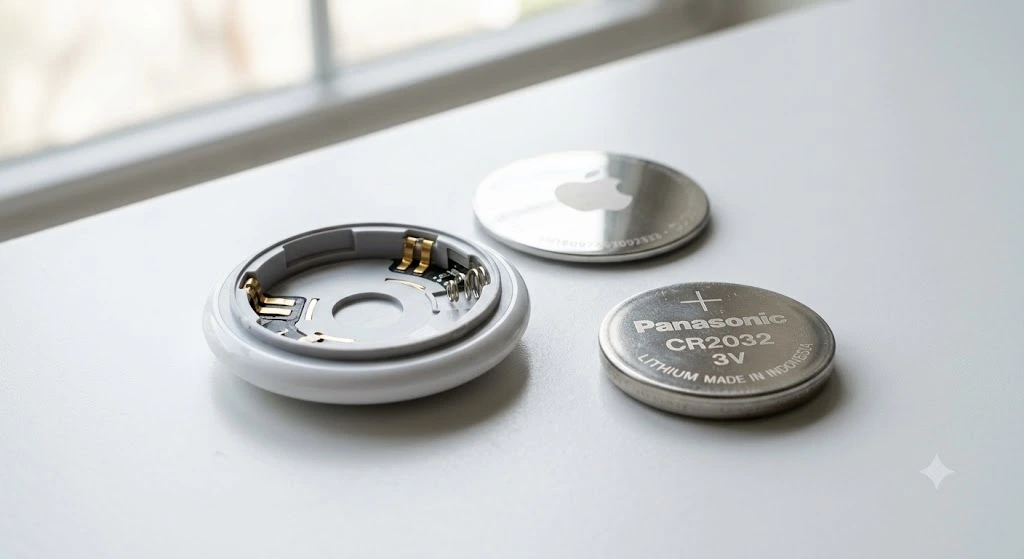
If your Apple AirTag battery is running low or has stopped working, the good news is that replacing it is usually quick and inexpensive. Apple designed the AirTag to use a standard CR2032 coin cell battery, so you do not need special tools or technical knowledge. In many cases, a fresh battery is all it takes to get your AirTag working again.
However, not every battery problem has the same cause. Sometimes the battery is simply depleted, while other times the new battery may not be making proper contact or could be incompatible because of a bitter coating. Understanding the signs and following the right steps can save time and prevent unnecessary frustration.
Before replacing the battery, it helps to identify whether the issue is actually battery related. The sections below explain what to look for and what to do next.
| Situation | Most Likely Cause | First Thing to Check |
| Low battery notification | Battery nearing end of life | Replace the CR2032 battery |
| AirTag not responding | Dead or incorrectly installed battery | Battery orientation |
| New battery not working | Battery coating or poor contact | Battery compatibility |
| AirTag missing from Find My | Battery or connection issue | Bluetooth and battery status |
| Battery drains quickly | Frequent tracking or hardware issue | Usage patterns and battery quality |
Why the Apple AirTag Battery Is Important
The battery is the only power source inside an Apple AirTag. Without enough power, the AirTag cannot communicate with nearby Apple devices, play sounds, or update its location through the Find My network. Even though the AirTag is designed for long battery life, every battery eventually needs replacement.
Unlike rechargeable accessories, AirTags use a removable battery. This design lets users replace the battery in seconds instead of replacing the entire device. A quality battery also helps maintain reliable tracking and consistent performance. Ignoring a low battery warning can cause your AirTag to stop updating its location at the worst possible time. Replacing the battery before it completely dies helps avoid interruptions when tracking valuable items.
If you’re troubleshooting other Apple devices or your computer as well, you may also find our guide on SSD not showing up helpful. It explains the most common causes of storage detection issues and the steps you can take to fix them without risking your data.
How to Know if Your AirTag Battery Is Running Low
Apple makes it easy to recognize when an AirTag battery needs attention. The Find My app usually displays a low battery warning before the battery becomes completely depleted.
In some situations, you may notice changes before receiving a notification. The AirTag might stop playing sounds, update its location less frequently, or disappear from the Find My app if the battery is completely exhausted.
Common signs include:
| Sign | What It Usually Means |
| Low Battery alert in Find My | Battery is nearly empty |
| AirTag will not play a sound | Battery may be dead |
| Location stops updating | Battery or connection issue |
| AirTag becomes unreachable | Battery could be fully depleted |
| No response after pressing the cover | Battery may not have power |
Which Battery Does an Apple AirTag Use?
Apple AirTags use a CR2032 lithium coin cell battery. This battery is widely available in supermarkets, electronics stores, pharmacies, and online retailers. Most reputable battery brands offer compatible CR2032 batteries.
Although many CR2032 batteries look identical, not every version performs the same inside an AirTag. Some batteries include a bitter coating that helps prevent children from swallowing them. Certain coated batteries may not make proper electrical contact inside the AirTag, preventing it from turning on even when the battery is new.
| Battery Type | Compatible with AirTag | Notes |
| Standard CR2032 | Yes | Recommended choice |
| CR2025 | No | Too thin for proper contact |
| CR2016 | No | Lower capacity and incorrect size |
| Rechargeable coin cell | Not recommended | May not provide the correct voltage |
Before Replacing the Battery
Before opening your AirTag, make sure the battery is actually the problem. If the AirTag still appears in the Find My app and updates its location normally, replacing the battery may not solve your issue.
Take a moment to inspect the AirTag for physical damage. If the stainless steel cover is bent or the battery compartment is dirty, cleaning the contacts may help improve performance. Also verify that Bluetooth is enabled on your iPhone and that your AirTag remains linked to your Apple ID.
A quick inspection before replacing the battery can prevent unnecessary troubleshooting later.
Is the Battery Actually Dead?
A low battery warning does not always mean the battery has already failed. In many cases, the AirTag continues working for a short period before the battery becomes completely depleted. This gives users time to purchase a replacement.
If your AirTag suddenly stops responding without showing a low battery alert, another issue could be responsible. Bluetooth connectivity, software glitches, or incorrect battery installation can produce similar symptoms.
Use this checklist before replacing the battery:
| Question | If Yes | If No |
| Does Find My show a low battery warning? | Replace the battery | Continue troubleshooting |
| Can the AirTag play a sound? | Battery may still have power | Battery may be dead |
| Does the AirTag appear in Find My? | Check connection issues | Replace battery or inspect device |
| Has the battery been installed for about one year? | Replacement is likely needed | Battery may still be healthy |
Quick Checks Before Installing a New Battery
A few simple checks can save you from replacing a battery unnecessarily. Start by confirming that you have the correct CR2032 battery. Some packaging looks similar even though the battery model is different.
Next, inspect the battery contacts inside the AirTag. Dust, fingerprints, or corrosion can reduce electrical contact. Wiping both the battery and the metal contacts with a clean, dry cloth is often enough to improve the connection.
Finally, make sure the positive side of the battery faces upward before closing the AirTag. An incorrectly installed battery will prevent the AirTag from powering on, even if the battery is brand new.
| Check | Why It Matters |
| Correct battery model | Prevents compatibility issues |
| Clean battery contacts | Improves electrical connection |
| Proper battery orientation | Allows AirTag to power on |
| Battery package undamaged | Ensures the battery is fresh |
| Stainless steel cover locks securely | Keeps the battery firmly in place |
How to Replace an Apple AirTag Battery

Replacing an Apple AirTag battery takes less than a minute if you follow the correct steps. The process does not require any tools, making it one of the easiest Apple devices to maintain. Before you begin, have a fresh CR2032 battery ready and work on a clean, flat surface.
Hold the AirTag with the stainless steel side facing up. Press down on the metal cover using two fingers and rotate it counterclockwise until it stops. Lift the cover away, remove the old battery, and insert the new one with the positive side facing upward. Once you hear a small chime, place the cover back on and rotate it clockwise until it locks into place.
AirTag Still Not Working After Replacing the Battery?
A new battery does not always solve the problem immediately. If your AirTag remains unresponsive after installation, the issue could be related to the battery itself, the contacts inside the AirTag, or the way the battery was installed.
Start by removing the battery and checking its orientation. Even a slight misalignment can prevent the AirTag from receiving power. Reinstall the battery carefully and listen for the startup sound. If there is no sound, inspect the battery compartment for dirt or damage before trying another compatible battery.
Check the Battery Orientation
One of the most common mistakes is inserting the battery upside down. The positive side, marked with a plus symbol, should always face outward toward the stainless steel cover. If the battery is reversed, the AirTag will not power on.
After inserting the battery correctly, press it gently until you hear the confirmation chime. This sound indicates that the AirTag has successfully received power. If there is still no response, continue with the remaining troubleshooting steps.
Could the Battery Be Incompatible?
Not every CR2032 battery works perfectly with an AirTag. Some manufacturers apply a bitter coating to discourage accidental swallowing by children. While this coating improves safety, it can interfere with the electrical contacts inside certain AirTags.
If your brand-new battery does not work, try another CR2032 battery from a different manufacturer. Many users find that switching brands solves the problem without any additional troubleshooting.
Clean the Battery Contacts
Over time, dust, fingerprints, or slight corrosion may build up inside the battery compartment. These contaminants can reduce electrical contact and stop the AirTag from receiving enough power.
Use a clean microfiber cloth to wipe both the battery and the metal contacts. Avoid using excessive moisture or abrasive materials that could damage the internal components. Once everything is clean, reinstall the battery and check whether the AirTag powers on.
How Long Does an Apple AirTag Battery Last?
Apple AirTags are designed to provide long battery life under normal conditions. Most users can expect the battery to last around one year before it needs replacement. Actual battery life depends on how often the AirTag is used and how frequently features like Precision Finding and sound playback are activated.
An AirTag attached to frequently used items, such as keys or a backpack, may consume more power than one that remains mostly stationary. Playing sounds repeatedly or using location tracking more often can also shorten battery life.
Can You Recharge an AirTag Battery?
No, Apple AirTags are not rechargeable. The CR2032 battery is disposable and should be replaced when it reaches the end of its lifespan. Attempting to recharge a standard CR2032 battery is unsafe and can permanently damage the battery or create a safety risk.
Instead of looking for charging accessories, simply replace the old battery with a fresh CR2032 coin cell. The replacement process only takes a few moments and restores the AirTag to normal operation.
Best Battery Practices for AirTags
Choosing a quality battery helps ensure reliable performance throughout the year. Purchasing batteries from reputable brands also reduces the chances of receiving old or counterfeit batteries with reduced capacity.
Store spare batteries in a cool, dry place away from direct sunlight. Before installing a new battery, check its packaging for any visible damage or signs of leakage. Using fresh batteries with a recent manufacturing date can help maximize battery life.
Why Your AirTag Battery May Drain Faster
Although AirTags are designed for efficiency, some situations can cause the battery to wear out sooner than expected. Frequent use of the built-in speaker, repeated location updates, and constant movement can increase power consumption over time.
Environmental conditions also play a role. Extremely hot or cold temperatures may temporarily reduce battery performance. If your AirTag battery seems to drain unusually quickly despite normal use, replacing it with a high-quality battery is a good first step before assuming the device has a hardware problem.
Reset Your AirTag After Replacing the Battery
If your AirTag still does not respond after installing a new battery, performing a reset may solve the problem. A reset can refresh the connection between the AirTag and your Apple devices without requiring any special tools.
To reset the AirTag, remove and reinstall the battery five times. Each time you insert the battery, press it down until you hear the startup sound before removing it again. On the fifth insertion, the AirTag should play a different sound, indicating that the reset was successful. Afterward, close the cover securely and reconnect the AirTag through the Find My app if needed.
How to Check AirTag Battery Status
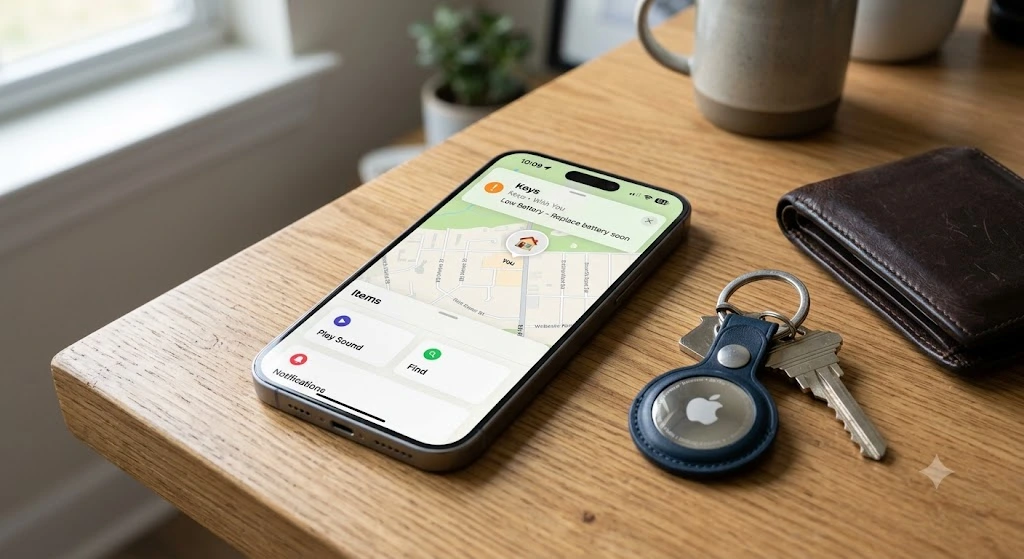
Apple does not display an exact battery percentage for AirTags. Instead, the Find My app notifies you when the battery becomes low enough to require replacement. This helps avoid unnecessary battery changes while ensuring the AirTag continues working reliably.
To check the battery status, open the Find My app on your iPhone or iPad and select the Items tab. Choose your AirTag from the list. If the battery is running low, you will see a notification recommending a replacement. If there is no warning, the battery is generally considered to have sufficient power.
Does Apple AirTag Come With a Battery?
Every new Apple AirTag includes a CR2032 battery already installed, so you can start using it immediately after setup. There is no need to purchase a battery separately when buying a brand-new AirTag.
A plastic pull tab keeps the battery disconnected during shipping. Once you remove this tab, the AirTag powers on automatically and plays a sound to indicate it is ready for pairing with your iPhone.
How to Pair an AirTag After Replacing the Battery
In most cases, replacing the battery does not require you to pair the AirTag again. Since the AirTag remains linked to your Apple ID, it should reconnect automatically once it powers on.
If your AirTag does not appear in the Find My app after replacing the battery, move it close to your iPhone and ensure Bluetooth is enabled. If necessary, reset the AirTag and complete the setup process again.
Can You Replace the Battery Without Removing the AirTag From Your Apple ID?
Yes. Battery replacement does not affect your Apple ID or your saved AirTag settings. The AirTag continues to belong to your account, and your tracking history remains unchanged.
You only need to remove the AirTag from your Apple ID if you plan to sell it, give it to someone else, or replace it with a different device.
How Much Does an Apple AirTag Battery Cost?
One reason AirTags are inexpensive to maintain is the low cost of replacement batteries. A quality CR2032 battery is widely available and usually costs only a few dollars, while multi-packs offer even better value.
Because the battery lasts around a year for most users, the ongoing cost of owning an AirTag is very low compared to many rechargeable tracking devices.
Can You Use an AirTag Immediately After Changing the Battery?
Yes. Once the new battery is installed correctly and you hear the startup chime, the AirTag is ready to use. There is no charging period or activation delay.
Open the Find My app to confirm the AirTag appears normally. You can also play a sound or check its location to verify that everything is working correctly.
Common Mistakes to Avoid When Replacing an AirTag Battery
Replacing an AirTag battery is simple, but small mistakes can prevent it from working properly. Using the wrong battery size, touching the battery contacts with dirty hands, or failing to lock the stainless steel cover completely are common issues.
Another mistake is assuming every CR2032 battery works the same. Some batteries with a bitter coating may not make proper contact inside certain AirTags, leading users to think the AirTag is defective when the battery is actually the problem.
How to Dispose of an Old AirTag Battery Safely
Used CR2032 batteries should never be thrown into regular household trash. Since they contain lithium, they should be recycled according to your local electronic waste or battery recycling guidelines.
Keep old batteries away from children and pets, as coin cell batteries can present a serious swallowing hazard. Store used batteries safely until they can be recycled at an approved collection point.
Does AirTag Battery Life Change With Different Uses?
Yes. Battery life depends on how you use your AirTag. An AirTag attached to frequently moved items, such as keys or luggage, may consume more power than one attached to an item that rarely changes location.
Using Precision Finding, playing sounds frequently, or checking the AirTag’s location many times throughout the day can also reduce battery life slightly over time.
Signs Your AirTag May Have a Hardware Problem
Sometimes the battery is not the real issue. If you’ve tried multiple compatible batteries and the AirTag still refuses to work, the device itself may have developed a hardware fault.
Common warning signs include the AirTag failing to play its startup sound, disappearing from the Find My network despite a new battery, or becoming completely undetectable by nearby Apple devices. Physical damage from drops, water exposure, or extreme temperatures can also affect the internal electronics.
If these symptoms continue after basic troubleshooting, contacting Apple Support or visiting an authorized service provider may be the next step.
Tips to Make Your AirTag Battery Last Longer
Although you cannot significantly increase the battery’s capacity, a few habits can help maximize its lifespan. Avoid playing the AirTag sound repeatedly unless necessary, as frequent speaker use consumes additional power.
Keeping the AirTag away from prolonged exposure to very high or very low temperatures can also improve battery performance. If you store an AirTag for an extended period, check its battery before using it again to ensure it still has enough power for reliable tracking.
Replacing the battery as soon as you receive a low battery notification also helps maintain uninterrupted location updates.
When Should You Replace the Battery?
There is no need to replace an AirTag battery on a fixed schedule. The best time is when the Find My app alerts you that the battery is running low or when the AirTag begins showing signs of reduced performance.
If you rely on your AirTag for tracking important items like keys, luggage, or wallets, keeping a spare CR2032 battery at home can help you avoid unexpected downtime. Since these batteries are inexpensive and widely available, replacing one before a trip or long vacation is often a smart precaution.
Final Thoughts
The Apple AirTag battery is designed to be simple to replace, making routine maintenance quick and affordable. In most cases, a fresh CR2032 battery restores normal operation within minutes. Paying attention to low battery notifications and using compatible batteries can help prevent unnecessary connection problems.
If replacing the battery does not resolve the issue, checking the battery orientation, cleaning the contacts, resetting the AirTag, and verifying its status in the Find My app are the next logical steps. Working through these checks one at a time makes it easier to identify the real cause without replacing the AirTag unnecessarily.
Frequently Asked Questions
What battery does an Apple AirTag use?
Apple AirTags use a standard CR2032 lithium coin cell battery. It is easy to find in most electronics stores, supermarkets, pharmacies, and online retailers. Always choose a compatible battery from a reputable brand for the best performance.
How long does an Apple AirTag battery last?
Most Apple AirTag batteries last about one year under normal use. Battery life can vary depending on how often you use features like Precision Finding, location updates, and sound playback.
Can you recharge an Apple AirTag battery?
No. Apple AirTags are not rechargeable. When the battery runs out, simply replace it with a new CR2032 battery.
Why is my AirTag not working after replacing the battery?
This can happen if the battery is installed incorrectly, the contacts are dirty, or the battery has a bitter coating that prevents proper contact. Double-check the installation and try another compatible CR2032 battery if necessary.
How do I know when my AirTag battery is low?
The Find My app will display a low battery notification when it’s time for a replacement. Apple does not show an exact battery percentage for AirTags.
Can I use any CR2032 battery in my AirTag?
Most CR2032 batteries work, but some with a bitter coating may not make proper contact inside the AirTag. If one battery does not work, try another brand that is fully compatible.
How often should I replace my AirTag battery?
There is no fixed replacement schedule. Replace the battery whenever the Find My app alerts you that it is running low or when the AirTag stops functioning properly.
Will replacing the battery erase my AirTag settings?
No. Replacing the battery does not remove your AirTag from your Apple ID or erase its settings. After installing the new battery, it should reconnect automatically.
Can extreme temperatures affect AirTag battery life?
Yes. Very hot or very cold temperatures can temporarily reduce battery performance and shorten its lifespan. Using your AirTag in normal operating conditions helps maximize battery life.
What should I do if my AirTag still doesn’t work after changing the battery?
Check that the battery is installed correctly, clean the battery contacts, try another compatible CR2032 battery, and reset the AirTag. If the problem continues, the device may have a hardware issue and should be inspected by Apple Support.