Why Is My Upload Speed So Slow? Causes, Fixes, and Speed Test Tips

A slow upload speed can quickly turn routine online tasks into a frustrating experience. Video calls freeze, large files take forever to upload, cloud backups seem stuck, and live streams lose quality without warning. What’s even more confusing is that your download speed may still look perfectly normal, making it difficult to understand what’s causing the problem.
After troubleshooting internet performance issues across different home networks and connection types, one thing becomes clear: slow upload speeds rarely have a single cause. In many cases, the issue comes down to background uploads, Wi-Fi interference, outdated networking equipment, or the limitations of an internet plan. In other situations, the problem starts with the internet service provider (ISP).
This guide explains the most common reasons your upload speed may be slow, shows you how to test your connection accurately, and walks through practical troubleshooting steps based on real-world scenarios. By the end, you’ll know how to identify the cause of slow uploads and decide whether the solution is a simple network adjustment, equipment upgrade, or contacting your ISP.
Upload vs. Download – What’s the Difference?
Your internet connection is constantly sending and receiving data, and download and upload speeds measure how quickly each of these happens. Both matter, but they serve very different purposes. According to the Federal Communications Commission (FCC), download speed determines how quickly you receive data, while upload speed determines how efficiently your device sends information out, something you rely on heavily during video conferencing, cloud backups, and file sharing.
Download
Download speed measures how quickly your device pulls data from the internet. Every time you stream a video, load a webpage, download a file, or install a game, you’re putting your download speed to work. Most internet plans are built with much faster download speeds than upload speeds, simply because people tend to download far more than they upload.
Common activities that lean on download speed include:
- Streaming movies and TV shows
- Browsing websites
- Downloading files
- Playing online games
- Updating apps and software
Upload
Upload speed measures how quickly your device sends data back out to the internet, and it becomes especially important any time you’re sharing information online. Uploading a video to YouTube, sending large files through cloud storage, joining a video meeting, or live streaming all depend heavily on solid upload performance.
When your upload speed isn’t up to par, you’ll likely notice:
- Frozen or blurry video calls
- Slow file uploads
- Interrupted live streams
- Delayed cloud backups
- Poor voice quality during online meetings
Upload speeds are typically lower than download speeds by design, but that doesn’t make them any less important to your overall internet experience.
Why Are Upload Speeds Important?
Most people focus on download speed when shopping for an internet plan, but upload speed plays an equally important role in many modern online activities.
Remote work has made video meetings part of daily life, and platforms like Zoom, Microsoft Teams, and Google Meet all depend on a stable upload connection. A weak upload speed can cause your video to freeze or your voice to break up mid-call.
If you work from home, slow uploads can affect far more than just video calls. Sharing presentations, sending large files to coworkers, syncing cloud storage, and running a VPN all rely on consistent upload performance. Even with a lightning-fast download speed, poor upload performance can quietly disrupt your entire workday. If you’re also dealing with office equipment that won’t connect properly, our guide on why is my printer offline covers common printer connection issues and how to fix them.
Content creators feel this even more directly. Whether you’re uploading YouTube videos, streaming on Twitch, posting Instagram Reels, or backing up large video projects to the cloud, a slow upload connection can significantly stretch out waiting times. Faster uploads mean creators can publish more efficiently with fewer interruptions during live streaming.
Gamers benefit from strong upload speeds too. While online games mostly rely on download speed to receive game data, every move you make gets sent back to the server through your upload connection. A stable upload speed helps keep gameplay smooth, especially during multiplayer sessions and voice chat.
Upload speed also matters for:
- Backing up files to cloud storage
- Sending large work documents
- Sharing high-resolution photos and videos
- Using security cameras that upload footage online
- Hosting online meetings and webinars
As more devices connect to the internet in more households, upload speed becomes increasingly critical. Understanding how it works is the first step toward solving any slow connection issues you might be facing.
How to Check Your Upload Speed
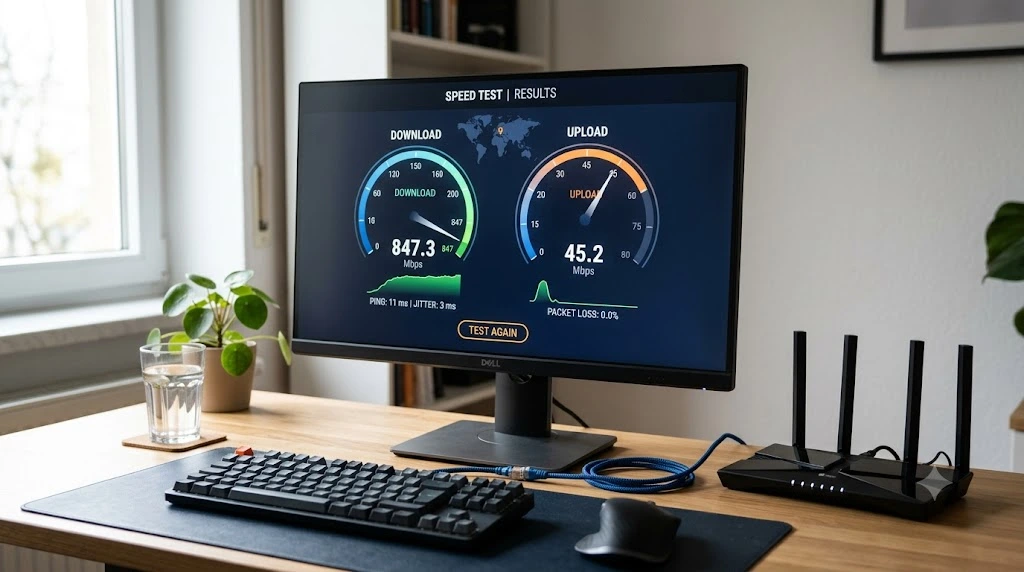
Before trying to fix a slow upload speed, it’s worth confirming whether your connection is actually underperforming compared to your plan. Running a proper speed test helps you pinpoint whether the issue lies with your home network or your ISP.
For the most accurate results, connect your computer directly to your router with an Ethernet cable and close any apps that might be uploading files in the background. Run a speed test using a trusted tool, repeat it at least three times, and compare the average against the upload speed listed in your internet plan.
It’s also worth testing your connection at different times of day. If your upload speed drops noticeably in the evening compared to the morning, network congestion, rather than your equipment, may be the real culprit.
Why Is Upload Speed Slower Than Download?
If you’ve ever compared your upload and download numbers, you’ve probably noticed a big gap between them. This is completely normal for most home internet plans.
Most providers design their networks to prioritize downloads over uploads, since people typically spend more time streaming, browsing, and downloading than they do sending large amounts of data. As a result, ISPs allocate more bandwidth toward downloads.
That said, slow upload speeds aren’t always expected or acceptable. If your upload speed falls well short of what your plan promises, something else may be affecting your connection. Here are the most common culprits.
Lack of Bandwidth From Your ISP
Your ISP plays a major role in determining your upload speed, and many residential plans offer far lower upload speeds than download speeds. This setup, known as an asymmetric connection, is especially common with cable and DSL services. For example, a plan might advertise 500 Mbps download but only 20 Mbps upload.
Your upload speed can also dip during peak hours, when many people in your area are streaming, gaming, or working from home at the same time, putting extra strain on your ISP’s network.
If your speed test consistently shows upload speeds well below your plan, it’s worth contacting your ISP. They can check for outages, network issues, or account problems, and if you regularly upload large files or work remotely, upgrading to a plan with higher upload speeds may be worth considering.
Multiple Devices on Your Network
Every device connected to your network shares the same pool of bandwidth, so if several devices are uploading data at once, your available upload speed can disappear fast.
Common devices and services that quietly eat up upload bandwidth include:
- Cloud storage services like Google Drive, Dropbox, and OneDrive
- Security cameras that upload recordings
- Smartphones backing up photos and videos
- Gaming consoles downloading updates while uploading game data
- Smart home devices connected to the cloud
- Multiple video calls running at the same time
This is especially common in busy households where multiple people are working, studying, gaming, or streaming simultaneously. Individually, each activity might only use a small amount of bandwidth, but combined, they can add up to a noticeable slowdown.
Equipment Issues
Your networking hardware has a direct impact on upload performance. A faulty router, damaged Ethernet cable, outdated modem, or weak Wi-Fi signal can all quietly drag your upload speed down.
Common equipment problems include:
- Old routers that can’t handle modern internet speeds
- Damaged Ethernet cables
- Loose cable connections
- Outdated router firmware
- Overheating networking equipment
- Poor router placement that weakens the Wi-Fi signal
Restarting your modem and router is always a good first step. If the problem persists, inspect your cables for wear and confirm your router’s firmware is current. It’s also worth testing your connection over Ethernet; if your upload speed improves, your Wi-Fi network is likely the source of the problem.
Network Technology
The type of internet connection you have plays a big role in how much upload speed is even possible, since some technologies simply aren’t built for fast uploads.
| Internet Type | Typical Upload Speed |
| DSL | 1–10 Mbps |
| Cable | 10–35 Mbps |
| Fixed Wireless | 10–50 Mbps |
| 5G Home Internet | 15–50 Mbps |
| Satellite | 5–50 Mbps |
| Fiber Optic | 100 Mbps to 8 Gbps or higher |
Fiber optic internet stands out because it often delivers symmetrical speeds, meaning upload and download speeds are the same or very close. A 1 Gbps fiber plan, for instance, may deliver close to 1 Gbps in both directions, making it an excellent choice for remote workers, gamers, live streamers, and anyone who regularly uploads large files.
If your current connection type has a low upload ceiling, upgrading your router alone won’t fix the problem. In many cases, switching to a better internet service, or to fiber specifically, is the only real long-term solution.
Common Slow Upload Speed Problems
Sometimes the cause of a slow upload speed depends heavily on when and where the problem shows up. Recognizing these patterns can help you narrow down a solution more quickly.
Why Is My Upload Speed Slow but My Download Speed Is Fast?
This is one of the most common complaints, and it’s often just how the plan is designed. Most cable and DSL plans are built with much faster download speeds than upload speeds, so if your upload matches what your ISP advertises, your connection is likely working as intended. If it’s significantly below that number, though, your router, network congestion, or your ISP could be to blame.
Why Did My Upload Speed Suddenly Drop?
A sudden upload slowdown can follow a router update, a network outage, a background cloud backup, or scheduled ISP maintenance. Start by restarting your modem and router, then run another speed test. If the issue continues for several hours or affects every device on your network, it’s time to contact your ISP and check for service issues.
Why Is My Upload Speed Slow on One Device?
If only one device is struggling with slow uploads, the problem is usually specific to that device. Outdated network drivers, background applications, VPN software, or malware can all quietly reduce upload performance. Testing a different device on the same network is a quick way to confirm whether the issue is device-specific.
Why Is My Upload Speed Slow on Wi-Fi but Not Ethernet?
If your upload speed improves noticeably over Ethernet, your Wi-Fi connection is the likely culprit. Thick walls, distance from the router, and interference from nearby electronics can all weaken your wireless signal. Moving closer to the router or switching to the 5 GHz band often makes a real difference.
How Can I Improve My Upload Speeds?
Slow uploads don’t always mean you need a new internet plan. In many cases, a few simple checks are enough to fix the problem. Start with the easiest fixes first, then move on to more advanced troubleshooting if the issue sticks around.
Use an Ethernet Cable
A wired Ethernet connection is one of the fastest ways to get an accurate read on your internet speed. Unlike Wi-Fi, it creates a direct link between your device and router, cutting out signal interference and delivering a more stable connection.
Run a speed test while connected via Ethernet. If your upload speed improves, the issue is likely your Wi-Fi network rather than your ISP. If it stays slow even on Ethernet, move on to the next troubleshooting steps.
Check Your Equipment
Your networking equipment can hold back upload performance even when your internet plan itself is fast enough. It’s worth inspecting your setup for common issues, including:
- Damaged or worn Ethernet cables
- Loose cable connections
- Dust inside Ethernet ports
- An overheating router or modem
- A modem that frequently disconnects
- A router that restarts on its own
If possible, try a different Ethernet cable or plug into a different LAN port on your router. A faulty cable or damaged port can quietly limit upload speed without affecting downloads as much.
Update Your Router Firmware
Your router runs on firmware that governs how it manages internet traffic, and manufacturers regularly release updates to improve performance, security, and stability. If your router hasn’t been updated in a while, outdated firmware could be quietly affecting your upload speed.
Log in to your router’s admin panel and check for available updates. Many newer routers can update automatically, while older models require a manual install. After updating, restart your router and run another speed test to see if anything’s improved.
Check Your Router
Sometimes the router itself is the bottleneck, especially older models that struggle to keep up with modern speeds or multiple connected devices. Check whether your router:
- Supports your current internet speed
- Has enough processing power for multiple users
- Is overheating
- Has damaged Ethernet ports
- Is more than five years old
Router placement matters too. Keep it in an open area near the center of your home, away from furniture, cabinets, microwaves, cordless phones, and thick concrete walls, all of which can weaken the wireless signal.
More advanced users can also explore their router’s Quality of Service (QoS) settings to prioritize activities like video conferencing or gaming. Some routers also support Smart Queue Management (SQM), which helps reduce delays when multiple devices share the network. If slow uploads only happen over Wi-Fi, simply relocating your router can often solve the problem.

Check for Background Uploads
Many apps continue uploading data even when you’re not actively using them. Cloud storage services, automatic photo backups, security cameras, and software updates can all quietly consume a large share of your available upload bandwidth.
Before running another speed test, pause apps like Google Drive, Dropbox, OneDrive, iCloud Photos, and any other cloud backup services. If your upload speed jumps back up once these are paused, background uploads were likely the source of the slowdown.
Optimize Router QoS Settings
Quality of Service (QoS) is a feature built into many modern routers that lets you prioritize important activities, like video calls, online gaming, and live streaming, over background tasks such as cloud backups and software updates.
If your router supports QoS, turning it on and giving real-time applications higher priority can reduce upload delays and improve overall connection stability when multiple devices are sharing the same network.
Which Internet Has the Fastest Upload Speed?
Not all internet connections deliver the same upload performance, and the underlying technology has a direct impact on how quickly you can upload files, join video calls, or stream live content.
| Internet Type | Typical Upload Speed | Best For |
| DSL | 1–10 Mbps | Basic browsing and email |
| Cable | 10–35 Mbps | Streaming and everyday home use |
| Fixed Wireless | 10–50 Mbps | Rural areas with limited options |
| 5G Home Internet | 15–50 Mbps | General home internet use |
| Satellite | 5–50 Mbps | Remote locations |
| Fiber Optic | 100 Mbps–8 Gbps+ | Remote work, gaming, streaming, and large file transfers |
How Are Symmetrical Speeds Possible?
Many fiber internet plans offer symmetrical speeds, meaning your upload speed matches your download speed. A 1 Gbps fiber connection, for example, can often deliver close to 1 Gbps in both directions.
This is possible because fiber optic cables use light signals to send and receive data efficiently over dedicated strands of glass. Unlike many cable and DSL connections, fiber networks are built from the ground up to support high-speed communication in both directions.
Symmetrical speeds bring several real advantages, including:
- Faster cloud backups
- Quicker file uploads
- Better video call quality
- Smoother live streaming
- More reliable remote work
- Faster content creation workflows
If your work depends on regularly sending large amounts of data, choosing a plan with symmetrical speeds can make a real difference in your day-to-day experience.
How Long Should File Uploads Take?
Upload times depend on both your internet speed and the size of the file you’re sending. The table below shows approximate upload times under ideal network conditions.
| File Size | 10 Mbps | 20 Mbps | 50 Mbps |
| 500 MB | About 7 minutes | About 3.5 minutes | About 1.5 minutes |
| 1 GB | About 14 minutes | About 7 minutes | About 3 minutes |
| 5 GB | About 70 minutes | About 35 minutes | About 14 minutes |
| 10 GB | About 2 hours 20 minutes | About 1 hour 10 minutes | About 28 minutes |
Keep in mind that actual upload times can vary depending on network congestion, Wi-Fi quality, and the speed of the receiving server.
Do I Need Good Upload Speeds for Gaming?
Yes, but probably not for the reason most people assume. A lot of gamers believe online games require very high upload speeds, but in reality, most multiplayer games use only a small amount of upload bandwidth. What matters more is a stable connection with low latency and minimal packet loss.
Every move, jump, shot, or interaction you make in a game sends data back to the server, and a stable upload connection helps that data arrive quickly and accurately. When upload speeds are slow or unstable, you may run into:
- Delayed player movements
- Voice chat interruptions
- Rubber banding
- Higher latency during matches
- Packet loss
- Frequent disconnects
| Activity | Recommended Upload Speed |
| Email and web browsing | 1 Mbps |
| HD video calls | 3–5 Mbps |
| 4K video calls | 10 Mbps |
| Online gaming | 3–5 Mbps |
| Voice chat while gaming | 3–5 Mbps |
| Live streaming in 1080p | 8–15 Mbps |
| Uploading large videos | 20 Mbps or higher |
| Cloud backups | 25 Mbps or higher |
Even with plenty of upload speed available, background uploads can still hurt gaming performance, so it’s worth pausing cloud backups and large file transfers before jumping into an online match.
Does Upload Speed Affect Video Calls?
Video conferencing apps like Zoom, Microsoft Teams, Google Meet, and Discord all depend on a stable upload connection to send your voice and video to other participants. When your upload speed is too low, video can freeze, audio can sound robotic, and calls can drop unexpectedly.
For smooth HD video calls, aim for an upload speed of at least 3 to 5 Mbps, and expect to need more bandwidth for higher resolutions or meetings with several participants.
When Should You Contact Your ISP?
If you’ve worked through every troubleshooting step and your upload speed is still well below expectations, it’s a good sign that it’s time to contact your ISP. Before you call, gather some basic details to help the support team diagnose the issue faster:
- Your internet plan’s advertised upload speed
- Results from several speed tests
- Whether you tested with Ethernet or Wi-Fi
- Whether all devices have the same problem
- The time when slow uploads usually occur
Running speed tests at different times of day can also help. If slow uploads only show up in the evening, network congestion is more likely to blame than your home setup.
Your ISP may uncover issues such as:
- Network congestion
- A damaged cable outside your home
- Problems with your modem
- Signal quality issues
- Maintenance work in your area
- Incorrect account provisioning
If your ISP confirms that your connection is working as expected but your upload speed still doesn’t meet your needs, upgrading to a faster internet plan may be the best long-term solution. This is especially helpful for households with multiple remote workers, content creators, frequent cloud backups, or anyone who regularly uploads large files.
Frequently Asked Questions
Why is my upload speed so slow but my download speed is fast?
This is common with many residential internet plans, since cable and DSL providers typically offer much higher download speeds than upload speeds. That said, slow uploads can also stem from network congestion, background applications, outdated equipment, or Wi-Fi interference.
What is a good upload speed?
The right upload speed depends on how you use your connection. Basic browsing and email need around 1 Mbps, video calls need 3–5 Mbps, live streaming needs 8–15 Mbps, and large file uploads benefit from 20 Mbps or more. Homes with several active users generally benefit from higher upload speeds overall.
Can a router cause slow upload speeds?
Yes. An old or faulty router can significantly reduce upload performance. Outdated firmware, overheating, damaged Ethernet ports, or poor Wi-Fi coverage can all contribute to the slowdown.
Does Wi-Fi affect upload speed?
Yes. Walls, electronic devices, and distance from the router can all weaken your Wi-Fi signal. If your upload speed improves when you switch to Ethernet, your wireless network is likely the source of the problem.
Can background apps slow my upload speed?
Yes. Cloud storage services, automatic backups, software updates, and file-sharing apps can quietly use up upload bandwidth without you noticing. Closing these applications often brings upload performance right back up.
How can I test my upload speed?
Use a trusted speed testing tool and run several tests at different times of day. For the most accurate results, connect your computer directly to the router with an Ethernet cable before testing.
Is fiber internet better for upload speeds?
Yes. Most fiber plans offer symmetrical speeds, meaning upload and download speeds are the same or very close, which makes fiber ideal for remote work, gaming, cloud backups, and uploading large files.
Will upgrading my internet plan improve upload speed?
It depends on your current plan. If your ISP is limiting upload bandwidth, upgrading to a plan with higher upload speeds, or switching to fiber internet, can improve performance significantly.
Conclusion
Slow upload speeds can be frustrating, but they’re usually easier to solve than most people expect. After troubleshooting many common upload speed issues, one pattern appears repeatedly: the problem often isn’t the internet connection itself. Background uploads, Wi-Fi interference, outdated equipment, network congestion, or the limitations of an internet plan are far more common causes than a complete service failure.
The most effective approach is to troubleshoot one step at a time. Start by running a proper speed test, check whether the issue affects every device, eliminate common causes within your home network, and contact your ISP only if your upload speed consistently falls below the performance included in your plan. Taking a structured approach helps you identify the real cause instead of replacing equipment or upgrading your plan unnecessarily.
A reliable upload speed makes everyday online activities much smoother, whether you’re working from home, joining video meetings, uploading content, gaming online, backing up files, or managing cloud-based applications. Understanding what affects upload performance puts you in a much better position to improve your connection and make informed decisions about your home network when changes are truly needed.