Small Font Generator: Create Small Caps, Superscript & Subscript
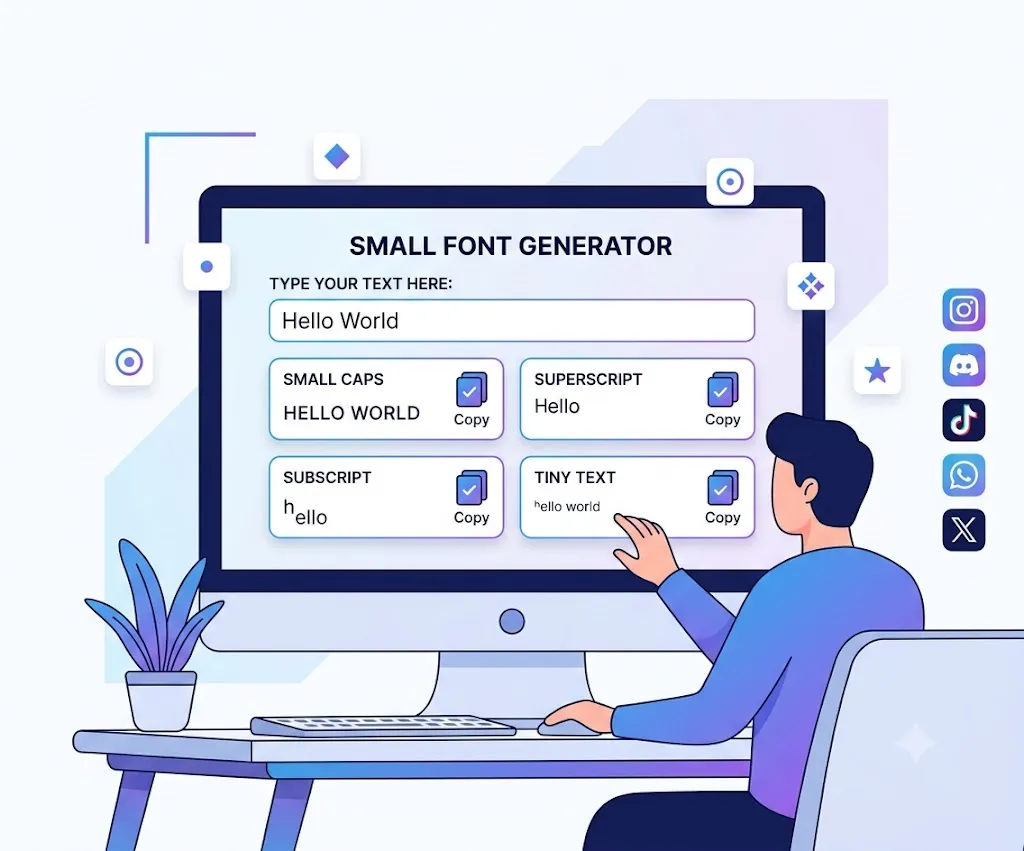
If you’ve ever tried to make your Instagram bio, Discord username, or social media profile stand out, you’ve probably searched for a small font generator. At first, it seems simple type your text, copy it, and paste it. But many users quickly run into frustrating problems, from characters that turn into empty boxes to letters that refuse to shrink along with the rest of the word.
Some platforms reject certain characters, others display broken symbols, and many people assume they’re using an actual “font” when they’re really copying special Unicode characters. While researching and testing today’s most popular small font generators, it became clear that most tools generate the text but do very little to explain how it works or why these compatibility issues happen which often leaves users confused when the styled text doesn’t render the way they expected.
This guide goes beyond simply generating small text. You’ll learn what a small font generator actually does, how Unicode makes copy-and-paste text possible, the differences between small caps, superscript, and subscript, where these styles work best, and the common mistakes to avoid. By the end, you’ll know not only how to create small text but also how to use it effectively across websites, apps, and social media platforms.
Whether you’re looking for copy-and-paste text, stylish text, fancy text, or a simple text converter, understanding how Unicode works will help you choose the right style for every platform.
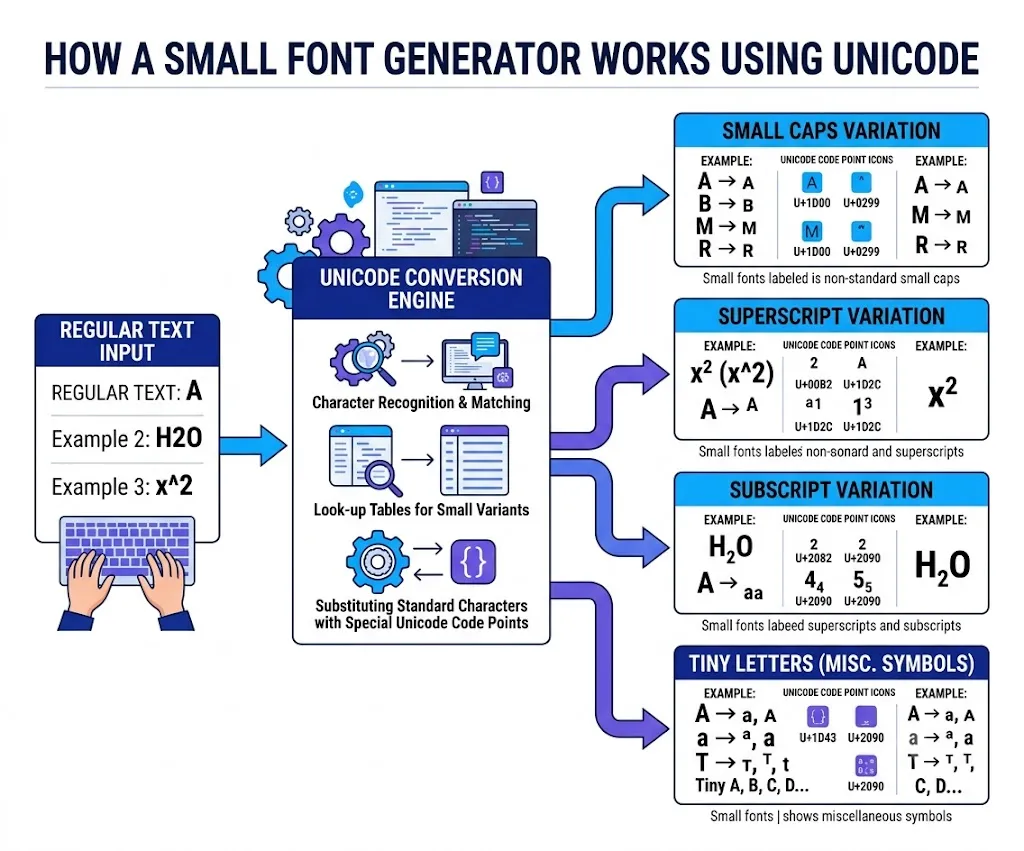
How to Use a Small Font Generator
Using a small font generator is quick and requires no technical knowledge at all. The process is designed to be beginner-friendly, so you can go from plain text to a stylish Unicode version in just a few seconds.
Follow these simple steps:
- Type or paste your text into the input box.
- The generator instantly creates multiple small text styles.
- Choose the style you like the most.
- Click Copy.
- Paste your new small text into your favorite website, app, or social media profile.
Most generators provide several styles at the same time, including:
- Small Caps
- Superscript
- Subscript
- Tiny Letters
This allows you to choose the style that best matches your purpose, whether that’s a decorative bio, a scientific formula, or a unique gaming username.
What Does a Small Font Generator Do?
It’s important to understand that it does not actually reduce the font size of your text instead, it swaps each letter with a different Unicode character that has a similar, smaller-looking appearance.
Unlike a traditional typeface or font family, a small font generator does not install or modify fonts on your device. Instead, it replaces standard letterforms with existing Unicode characters that visually resemble smaller text. Accessibility Considerations
For instance, the normal letter a is technically different from the superscript ᵃ or the small capital ᴀ. Even though they look related, each one is a distinct Unicode character with its own unique code point behind the scenes.
This approach offers several benefits:
- No software installation
- Works on most devices
- Easy copy-and-paste functionality
- Compatible with many social media platforms
- Free to use online
These Unicode symbols, sometimes called Unicode letters or special characters, come from the Unicode Standard rather than a downloadable font. This is what makes them easy to copy and paste across supported platforms.
Since the formatting is built directly into the characters themselves, the text keeps its appearance after you paste it into another application, rather than relying on a font file that might not carry over.
Who Uses a Small Font Generator?
People use a small font generator for many different reasons. While plenty of users simply want stylish text for social media, others rely on it for education, gaming, design, and creative branding purposes.
| User | Common Purpose |
| Social media users | Stylish bios, captions, and posts |
| Gamers | Usernames, clan tags, and nicknames |
| Students | Superscript, subscript, and formulas |
| Content creators | Personal branding and channel descriptions |
| Graphic designers | Typography and layouts |
| Developers | Unicode testing and formatting |
| Businesses | Creative marketing and promotional text |
When Should You Use Small Text?
Small text is useful whenever you want your content to stand out without leaning on traditional formatting like bold or italics. It works especially well as a lightweight way to add visual interest to short pieces of text.
Common use cases include:
- Instagram bios
- TikTok profiles
- Discord usernames
- X (formerly Twitter) bios
- Facebook posts
- Reddit comments
- YouTube descriptions
- WhatsApp status
- Telegram bios
- Gaming usernames
- Creative nicknames
- Online communities
Many creators also use small text for short headings, decorative captions, or stylish signatures. That said, it’s best to avoid long paragraphs in small text, since extended blocks of tiny characters can quickly become difficult to read.
Unicode
To understand how a small font generator works, you first need to understand Unicode, the system quietly powering all of this stylized text.
Unicode is the international standard that gives every character a unique number, called a code point. This allows computers, smartphones, and websites to display the same character consistently across different operating systems and languages, no matter where the text was originally created.
Before Unicode became the global standard, different computer systems used different character sets, and as a result, text often appeared as strange, garbled symbols when shared between devices. Unicode solved this problem by creating one universal system for representing characters everywhere.
The Unicode Consortium maintains and updates the Unicode Standard. Modern devices typically use character encoding formats such as UTF-8 and UTF-16 to store and display Unicode characters consistently. This standardized encoding helps ensure that small Unicode text appears correctly across websites, applications, and operating systems.
Today, the Unicode Standard contains more than 150,000 characters, including:
- Letters
- Numbers
- Mathematical symbols
- Currency symbols
- Emojis
- Ancient scripts
- Technical symbols
- Modifier letters used for superscript and small caps
A small font generator simply draws on these existing Unicode characters instead of creating a new font from scratch, which is exactly why you can copy the generated text and paste it into many websites while keeping the same appearance.
How the Small Font Conversion Works
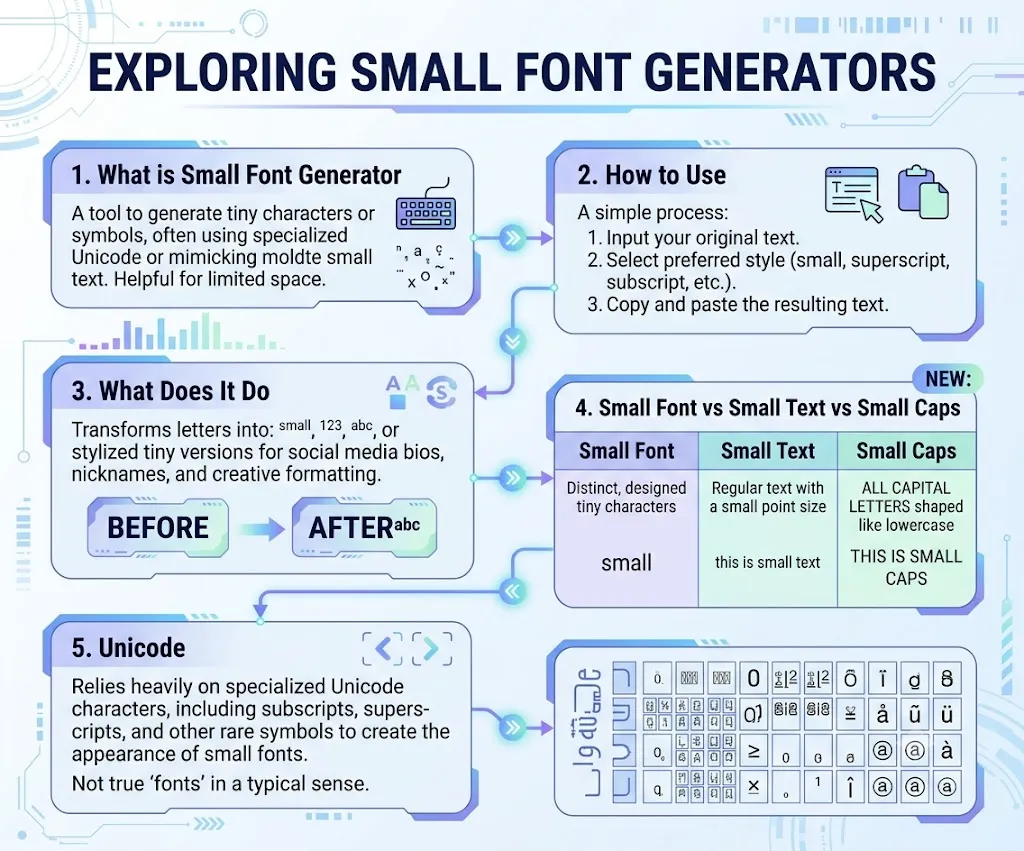
Many people assume the generator physically shrinks their text, but that isn’t quite what happens. Instead, it replaces each regular character with another Unicode character that simply looks smaller by design.
For example:
| Regular Character | Small Character |
| A | ᴀ |
| B | ʙ |
| H | ʜ |
| a | ᵃ |
| e | ᵉ |
| 2 | ² |
Every letter is matched with the closest available Unicode equivalent. However, Unicode does not include a complete set of small characters for every letter, so some styles may leave certain letters unchanged or substitute the closest available alternative instead.
This is why you may occasionally notice a normal-sized letter mixed in with small text — it isn’t a bug in the generator, but simply a limitation of the Unicode Standard itself. Fortunately, modern browsers and operating systems support most of these characters, which makes small text work reliably across the majority of platforms.
Small Caps
Small Caps are one of the most popular styles produced by a small font generator. They look like uppercase letters, but shorter and more visually balanced than normal capital letters, which is why designers and publishers have relied on them for years to improve readability and add subtle contrast.
For example:
- Regular: HELLO WORLD
- Small Caps: ʜᴇʟʟᴏ ᴡᴏʀʟᴅ
Many users choose Small Caps for:
- Instagram bios
- Brand names
- Profile headings
- YouTube channel descriptions
- Discord usernames
Although they resemble a font style, the generated characters are still Unicode symbols rather than an actual typeface. Because of Unicode’s limitations, a few letters such as Q and X may not have perfect small-cap equivalents, so most generators simply use the closest available Unicode character to keep the overall look consistent.
Superscript
Superscript characters appear slightly above the normal text line, giving words a raised, floating appearance. Unicode originally introduced these characters for mathematics, chemistry, phonetics, and academic writing, but today they’re also widely used for creative text formatting.
For example:
- x²
- H₂O (combined with subscripts)
- 10³
- ᴴᵉˡˡᵒ
A small font generator converts regular letters into their superscript versions whenever Unicode makes them available.
Superscript text is commonly used for:
- Mathematical equations
- Scientific notation
- Social media bios
- Decorative usernames
- Creative captions
Keep in mind that Unicode doesn’t include a complete superscript alphabet — some letters, such as Q, have no official superscript version, so most generators substitute the closest available character instead.
Subscript
Subscript characters sit slightly below the normal text line, which makes them especially useful in technical and scientific writing. They’re widely used in chemistry, mathematics, and engineering, where formulas like H₂O and CO₂ depend entirely on subscript characters to make sense.
A small font generator can also produce Unicode subscript text purely for decorative purposes. Examples include:
- ₕₑₗₗₒ
- ₁₂₃
- x₁
Subscript text is useful for:
- Chemical formulas
- Mathematical expressions
- Academic notes
- Creative usernames
- Social media bios
Unlike superscript, Unicode offers fewer subscript letters, so some characters simply don’t have a direct equivalent and remain unchanged after conversion. Even with these limitations, subscript text remains one of the most popular styles available in a modern small font generator.
Small Text for Students and Academic Writing
A small font generator is useful well beyond social media. Students often turn to superscript and subscript characters for school assignments, research notes, and scientific writing, where precise notation matters.
Common examples include:
- x²
- x³
- H₂O
- CO₂
- Na₂SO₄
Instead of memorizing keyboard shortcuts for each symbol, students can quickly generate these characters and copy them straight into compatible applications, saving time on formatting.
Browser and Platform Compatibility
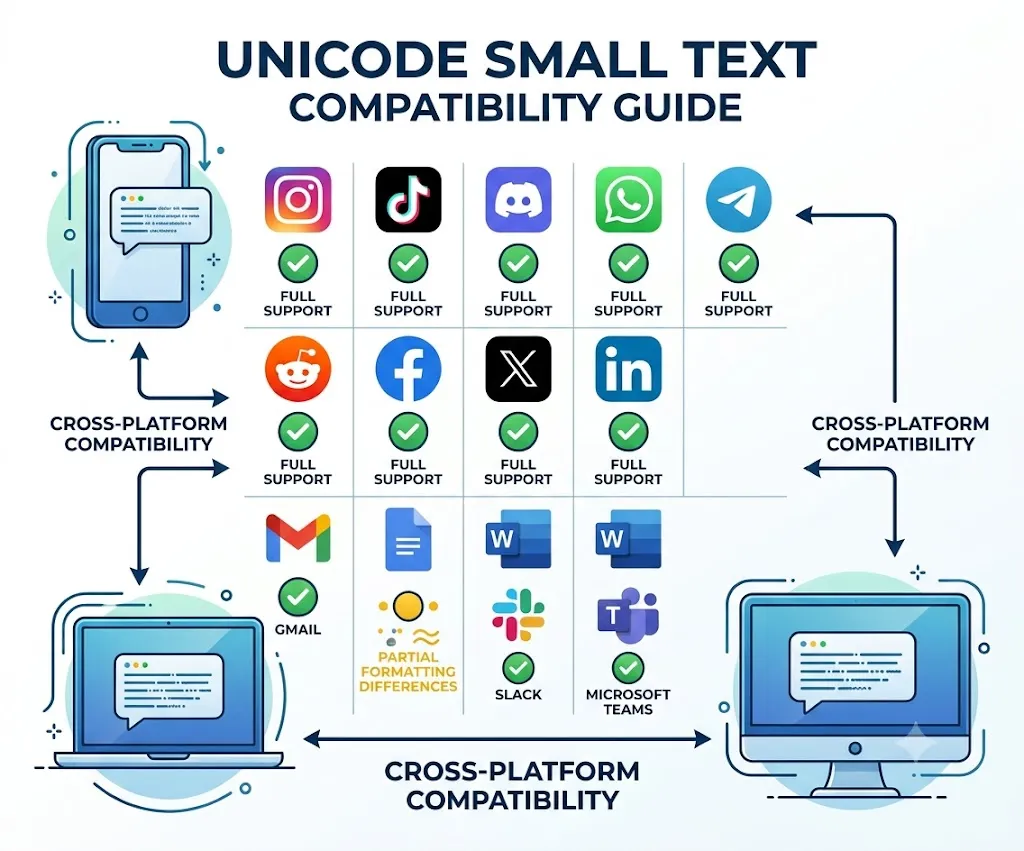
One of the biggest advantages of Unicode text is its wide compatibility across modern devices and applications. Since a small font generator creates genuine Unicode characters instead of image-based text, the generated output usually works wherever Unicode itself is supported.
| Platform | Support | Notes |
| ✅ | Works well in bios, captions, and comments | |
| TikTok | ✅ | Supported in profiles and captions |
| Discord | ✅ | Great for usernames and messages |
| ✅ | Works in posts and comments | |
| X (Twitter) | ✅ | Supported in bios and posts |
| ✅ | Unicode works alongside Markdown | |
| ✅ | Supported in chats and status updates | |
| Telegram | ✅ | Fully supported |
| ⚠️ | Some formatting may appear differently | |
| Gmail | ⚠️ | Appearance depends on the selected font |
Beyond social media, small Unicode text also works in many productivity and collaboration tools, including Microsoft Word, Google Docs, Microsoft PowerPoint, Notion, Slack, and Microsoft Teams. Appearance may vary slightly depending on the selected font and each application’s Unicode support, but most modern software displays these characters correctly.
Examples
A small font generator can transform the same piece of text into several different Unicode styles, and each style carries its own purpose and visual character.
Here are some common examples:
| Regular Text | Small Caps | Superscript | Subscript |
| Hello | ʜᴇʟʟᴏ | ᴴᵉˡˡᵒ | ₕₑₗₗₒ |
| Small Font | sᴍᴀʟʟ ꜰᴏɴᴛ | ˢᵐᵃˡˡ ᶠᵒⁿᵗ | ₛₘₐₗₗ 𝒻ₒₙₜ |
| Generator | ɢᴇɴᴇʀᴀᴛᴏʀ | ᴳᵉⁿᵉʳᵃᵗᵒʳ | 𝓰ₑₙₑᵣₐₜₒᵣ |
| Social Media | sᴏᴄɪᴀʟ ᴍᴇᴅɪᴀ | ˢᵒᶜⁱᵃˡ ᴹᵉᵈⁱᵃ | ₛₒ𝒸ᵢₐₗ ₘₑ𝒹ᵢₐ |
Each style relies on a different set of Unicode characters, which is exactly why the output stays visible after you copy and paste it into a supported platform. Keep in mind that some letters may stay unchanged, simply because Unicode doesn’t include every possible small character variant.
Where Can You Use Small Text?
A small font generator is useful anywhere you want your text to stand out without relying on images or graphics to do the work.
Popular places include:
- Instagram bios
- TikTok profiles
- Discord usernames
- X (Twitter) bios
- Facebook posts
- Reddit comments
- YouTube channel descriptions
- Telegram bios
- WhatsApp status
- Gaming usernames
- Creative signatures
- Online communities
Because the generated text is fully copyable, you can reuse it across multiple platforms at once without needing to make any changes along the way.
Tiny Letters
Tiny letters combine Unicode superscript, small-cap, and modifier characters to create extremely compact text that works well for bios, usernames, and decorative captions.
People often use tiny letters for:
- Instagram bios
- TikTok profiles
- Discord nicknames
- Gaming usernames
- Decorative captions
- Creative signatures
- Social media comments
For example:
| Normal | Tiny Letters |
| Creative Creator | ᶜʳᵉᵃᵗⁱᵛᵉ ᶜʳᵉᵃᵗᵒʳ |
Because Unicode has limited character support, tiny letters aren’t always available for every alphabet. Most generators automatically substitute the closest available character whenever a direct match is missing.
Tips and Tricks
A small font generator works best when it’s used in moderation. Following a few simple guidelines can help keep your styled text both eye-catching and easy to read.
Keep Your Text Short
Small text looks most attractive in short phrases. Long paragraphs tend to become difficult to read, simply because the characters are noticeably smaller than normal text.
Choose the Right Style
Different styles serve different purposes, so it helps to match the style to the context. Small Caps work well for headings, superscript suits decorative words and mathematical notation, subscript is ideal for scientific formulas, and tiny letters are perfect for short bios and usernames.
Test Before Publishing
Every platform displays Unicode a little differently. Before updating your profile or publishing a post, it’s worth pasting the generated text into the destination platform first to check exactly how it appears.
Avoid Overusing Small Text
Using small text in every sentence quickly reduces readability. Instead, it’s best reserved for headlines, usernames, bios, short quotes, and decorative labels. A little styling goes a long way toward creating a stronger visual effect.
Accessibility Considerations
Decorative Unicode text should be used carefully because some screen readers may interpret Unicode characters differently. For the best accessibility, reserve decorative text for headings, usernames, and short labels while keeping body content in standard text.
For the best user experience, use small text mainly for short headings, usernames, or decorative labels rather than long paragraphs. Keeping most of your content in standard text also improves readability for everyone, not just users of assistive technology.
On Reddit
Reddit supports its own special version of Markdown formatting, which means you don’t always need a small font generator just to get superscript inside a comment.
For example:
- 100 = 10^2
- or
- Normal text^(Superscript text)
Reddit automatically formats the text as superscript whenever you use its Markdown syntax. That said, a small font generator is still useful when you want genuine Unicode characters that work outside of Reddit; you can copy the generated text and use it across many other websites that support Unicode.
Build a More Memorable Online Brand
Content creators often use small Unicode text to make their profiles and branding feel more distinctive and recognizable. A small font generator can help style YouTube channel descriptions, Twitch bios, podcast names, newsletter titles, and portfolio pages.
For creators, freelancers, and businesses, decorative Unicode text can strengthen a recognizable digital identity and improve personal branding when used consistently across social profiles. A clean and readable style often leaves a stronger impression than excessive decoration.
It’s worth using decorative text sparingly, though, so it highlights the information that matters most while keeping the rest of your content easy to read.
Common Problems and Troubleshooting
If your generated text doesn’t appear correctly, the issue is usually related to the platform rather than the generator itself.
Here are some common problems and their solutions:
| Problem | Possible Cause |
| Characters appear as empty boxes | Device or font does not support that Unicode character |
| Some letters stay normal | Unicode does not include a matching small character |
| Username is rejected | The platform restricts certain Unicode characters |
| Text looks different on another device | Different operating systems use different fonts |
| Symbols disappear after pasting | The application removes unsupported Unicode characters |
Related Text Tools
If you enjoy using a small font generator, you may also find these tools helpful:
- Fancy Text Generator
- Tiny Text Generator
- Small Caps Generator
- Superscript Generator
- Subscript Generator
- Unicode Text Generator
- Bubble Text Generator
- Cursive Text Generator
- Glitch Text Generator
- Reverse Text Generator
- Case Converter
- Word Counter
These tools each use different Unicode character sets and formatting styles to create unique text for websites, documents, and social media.
Does Small Text Affect SEO?
Using a small font generator for decorative text on social media is perfectly fine and won’t cause any issues. However, using Unicode characters for important website content requires a bit more care and consideration.
Search engines are designed to understand Unicode, but decorative characters may not always match standard keyword searches the way regular text does. For example, writing your primary keyword entirely in decorative Unicode could make it less recognizable to users and may reduce overall readability.
For SEO purposes, it’s best to use regular text for headings, titles, URLs, and important keywords, while reserving small Unicode text purely for visual decoration. If you manage a website or blog, avoid replacing important headings or keywords with decorative Unicode text, standard text remains the best choice for page titles, URLs, headings, and structured content, since it offers the clearest experience for both users and search engines.
Does Small Text Work in AI Search?
AI systems such as ChatGPT, Google AI Overviews, Gemini, Microsoft Copilot, Claude, and Perplexity can generally understand Unicode text. However, decorative characters may be normalized before processing. For the best results, keep headings, keywords, and important information in standard text and use Unicode only for visual styling.
Frequently Asked Questions
Is a small font generator free to use?
Yes. Most online small font generators are completely free, and you can generate, copy, and paste Unicode text without ever creating an account.
Is small text the same as a font?
No. Small text is made from Unicode characters rather than traditional fonts, which is exactly why it works across so many different websites and apps.
Can I use small text on Instagram?
Yes. Instagram supports most Unicode characters in bios, captions, comments, and profile descriptions, though some display names or usernames may have character restrictions.
Does a small font generator work on mobile devices?
Yes. Most generators work smoothly on Android, iPhone, tablets, and desktop computers through any modern web browser.
Why do some letters stay normal-sized?
Unicode doesn’t include a complete set of small characters for every letter. When a matching character isn’t available, the generator either keeps the original letter or uses the closest available alternative.
Can I use small text in Microsoft Word or Google Docs?
Yes. Most Unicode characters work correctly in Microsoft Word, Google Docs, and many other document editors, although their appearance may vary slightly depending on the selected font.
Is a small font generator the same as a tiny font generator?
Yes. Terms such as tiny font generator, small text generator, and small letter generator are often used interchangeably. Most of these tools convert regular text into Unicode characters that appear smaller or more decorative while remaining easy to copy and paste.
Is small text searchable on Google?
Search engines can recognize Unicode characters, but decorative Unicode text may not always match standard keyword searches. For names, brands, and important keywords, it’s generally better to stick with regular text.
Our Testing Approach
To create this guide, we manually tested leading small font generators and compared how Unicode text rendered across desktop browsers, Android devices, iPhones, social media platforms, messaging apps, and document editors. We also reviewed the current Unicode Standard and evaluated compatibility, readability, and copy-and-paste behavior to ensure the recommendations reflect real-world usage rather than marketing claims.
Conclusion
Understanding Unicode is far more valuable than simply copying stylish text. Unicode text behaves across different platforms, one thing became clear: generating small text is easy, but understanding how it actually works makes a much bigger difference in the long run.
In practice, the best results come from using Unicode text for short, decorative content such as social media bios, usernames, headings, and creative captions. At the same time, it’s worth remembering that Unicode has real limitations: some characters simply aren’t available, and different platforms may display the same text slightly differently from one another.
If you’re using a small font generator for the first time, start with simple text, test it on the platform where you plan to use it, and choose the style that offers the best balance between appearance and readability. Small caps are usually the safest option for everyday use, while superscript and subscript work well for specific creative or academic purposes.
The most reliable generators don’t just convert text they help users understand Unicode and set realistic expectations about compatibility. Knowing the difference between fonts and Unicode characters will save you time, reduce formatting issues, and help you create text that looks great wherever you share it.
Whether you’re customizing an Instagram bio, creating a gaming username, formatting scientific notation, or simply experimenting with stylish text, you now have the knowledge to use a small font generator with confidence and if you often customize your smartphone, you may also want to learn how to keep your phone screen on while reading, gaming, or following tutorials.
Need another useful tech tool? Check out our guide on using sound to get water out of phone speakers safely.