
Tech Ideas That Made the Web Move Quicker
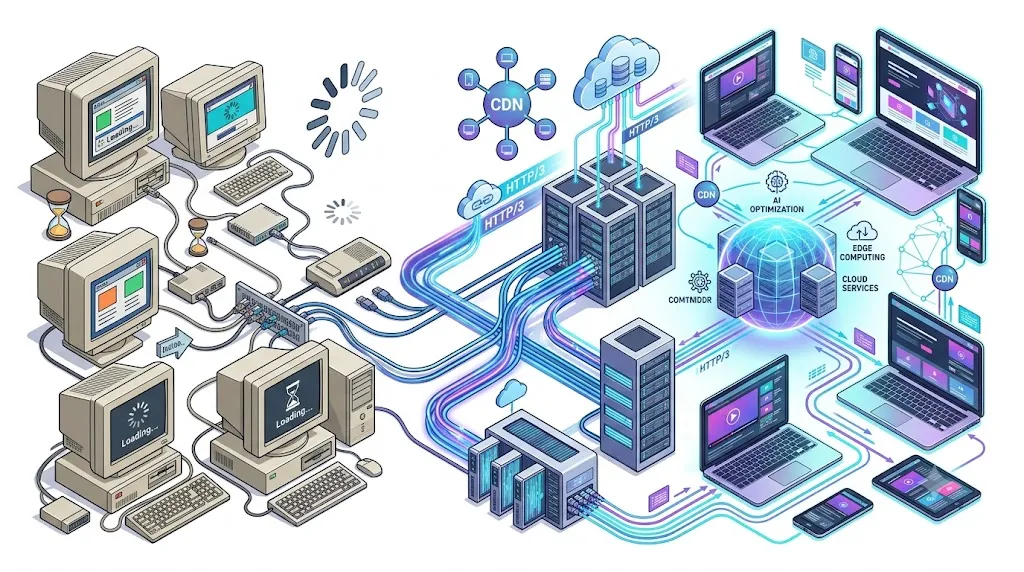
The internet feels almost instant today. You can open a website, stream a video, shop online, or start a video call within seconds. But if you’ve ever dealt with a slow website, you already know how frustrating the experience can be.
As someone who regularly works with websites and SEO, I’ve seen how even a small delay can affect user behavior. Visitors become impatient, pages are abandoned before they fully load, and businesses lose potential customers without realizing that speed is often the reason. Improving performance isn’t just about getting a better score in a testing tool. It’s about creating a smoother experience that keeps people engaged.
The web wasn’t always this fast. In the early days of the internet, webpages loaded line by line, images appeared slowly, and downloading a single file could take several minutes. Over the years, engineers introduced new protocols, faster networks, smarter browsers, and better development practices that completely changed how the internet works behind the scenes.
In this guide, we’ll explore the tech ideas that made the web move quicker, explain why each innovation mattered, and show how these technologies continue to improve the websites and online services we use every day.
Key Takeaways
If you only remember five things from this guide, remember these:
- The web became faster through many innovations, not one single invention.
- Broadband and fiber-optic internet reduced connection bottlenecks.
- HTTP/2 and HTTP/3 dramatically improved how browsers communicate with servers.
- CDNs, caching, and image optimization reduce loading time for users worldwide.
- AI, edge computing, and Core Web Vitals are shaping the next generation of web performance.
Understanding why the web became faster starts with looking beyond a single invention. Over the past three decades, engineers have introduced faster internet infrastructure, smarter browsers, improved communication protocols, advanced caching techniques, and global content delivery networks that work together to improve website performance.
Many of these improvements are now considered part of modern web performance standards, allowing browsers and developers to build significantly faster websites. In this guide, we’ll explore the technologies behind these innovations, explain why they matter, and show how they continue to shape the websites we use every day.
Why the Web Needed to Become Faster
When the World Wide Web became public in the early 1990s, websites looked nothing like they do now. Most pages contained little more than text and a handful of small images. People connected using dial-up modems, which offered painfully slow speeds compared to the broadband connections most of us take for granted today.
As the internet grew in popularity, websites grew right along with it. Developers began adding videos, animations, high-quality images, interactive forms, online shopping features, and cloud-based applications. Every new feature meant more data for browsers to download, and that created a real problem: users no longer had the patience to wait several seconds for a page to load. Research consistently shows that even a small delay can lower user satisfaction and push visitors to leave a website before it finishes loading.
Speed now touches nearly every part of the online experience:
| Benefit | Why It Matters |
| Better user experience | Visitors find information quickly. |
| Higher search rankings | Search engines reward faster websites. |
| More conversions | Customers are more likely to complete purchases. |
| Lower bounce rate | Visitors stay on the website longer. |
| Better mobile performance | Pages load smoothly on smartphones and tablets. |
As Google’s web performance team puts it, a fast site helps people accomplish what they came to do more quickly. That idea still shapes modern website optimization through Core Web Vitals and Google’s broader page experience guidelines.
A Quick Timeline of Web Speed Innovation
The internet didn’t become fast overnight. It improved gradually, through a series of smaller innovations spread across several decades, and each one solved a different problem on the way to the modern web we use today.
| Year | Major Innovation | Why It Mattered |
| 1989 | World Wide Web introduced | Made online information easier to share. |
| 1991 | HTTP 0.9 | Allowed browsers to request simple web pages. |
| 1997 | HTTP 1.1 | Improved communication between browsers and servers. |
| Early 2000s | Broadband internet | Replaced slow dial-up connections. |
| 2015 | HTTP/2 | Allowed multiple files to download together. |
| 2018 | Native lazy loading | Reduced unnecessary image downloads. |
| 2022 | HTTP/3 | Lowered latency and improved mobile browsing. |
| Today | AI and edge computing | Continue making websites faster and smarter. |
If you’re studying internet technology or computer science, these milestones offer a useful map of how the modern web evolved from simple, static pages into the interactive platforms people use constantly today.
The Rise of Broadband Internet
One of the earliest tech ideas that made the web move quicker was the shift from dial-up internet to broadband connections. Dial-up used ordinary telephone lines to connect people to the web, and it showed. Connections were slow and unreliable, and users often couldn’t make phone calls while they were online. Downloading a large file could eat up hours, and streaming video was basically out of the question.
Broadband changed all of that. Instead of connecting only when needed, it gave people an always-on internet connection with far higher speeds, laying the groundwork for everything that followed.
HTTP Evolution: The Foundation of Faster Websites
Every time you open a website, your browser communicates with a web server using a protocol called HTTP, short for Hypertext Transfer Protocol. It sounds simple enough, but the early versions of HTTP were never built with today’s websites in mind.
HTTP/1.0 and HTTP/1.1
The first widely used versions of HTTP handled simple websites just fine. Trouble started as webpages grew to include dozens, sometimes hundreds, of individual files. Older HTTP versions typically downloaded these resources one after another, or needed several separate connections to handle them, and that created noticeable delays before a page could fully appear on screen.
HTTP/2 Changed Everything
HTTP/2 turned out to be one of the biggest breakthroughs in modern web performance. Rather than opening a new connection for every file, it allowed multiple files to travel through a single connection at the same time, a technique known as multiplexing.
Think of it like several delivery trucks sharing one highway instead of each one waiting in line to use its own road. That’s essentially what HTTP/2 does for your files, letting them travel together instead of queuing up one by one.
HTTP/3 Took Speed Even Further
HTTP/3 is built on the QUIC transport protocol, which cuts down on connection delays and holds up better on unreliable networks. According to the Internet Engineering Task Force (IETF), HTTP/3 was designed to make web communication faster without sacrificing security.
Some of the biggest advantages of HTTP/3 include:
| Feature | Benefit |
| Faster connection setup | Pages begin loading sooner. |
| Lower latency | Less waiting between requests. |
| Better mobile performance | Connections recover quickly after network changes. |
| Improved reliability | Packet loss affects fewer resources. |
A Content Delivery Network, or CDN, solves a very specific problem: instead of storing every website file in one central location, a CDN keeps copies of important files on servers scattered around the world. When someone visits a website, the CDN automatically serves files from the nearest server rather than the original one, which dramatically cuts down the physical distance that data has to travel.
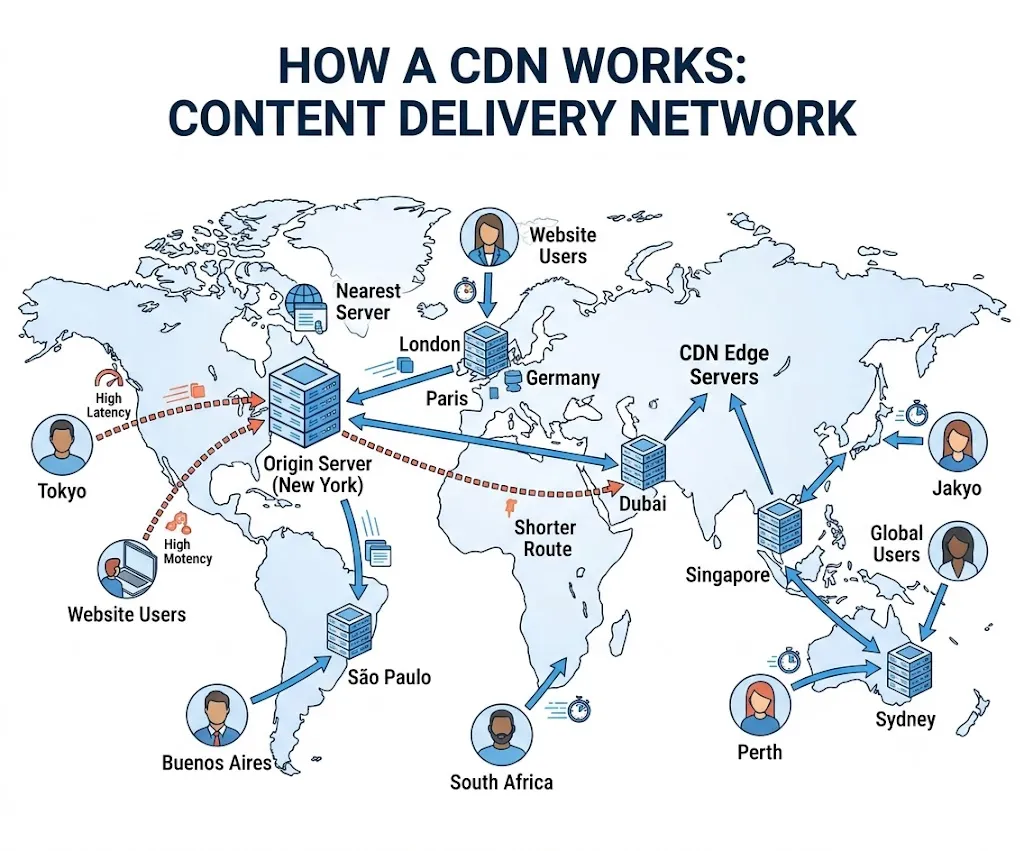
How a CDN Improves Website Speed
A CDN helps improve performance in several ways:
| CDN Feature | Performance Benefit |
| Global server locations | Visitors receive content from nearby servers. |
| Cached files | Frequently used files load much faster. |
| Load balancing | Traffic spreads across multiple servers. |
| Image optimization | Images load more efficiently. |
| Reduced latency | Browsers receive data more quickly. |
Browser Caching: Making Repeat Visits Faster
Not every website visit has to start from zero. One of the smartest tech ideas that made the web move quicker is browser caching, which allows your browser to save certain website files on your device after your very first visit.
Browsers typically store frequently used files such as images, stylesheets, scripts, and fonts. The next time you visit the same website, your browser checks whether it already has these files saved locally. If it does, it loads them straight from your device instead of downloading them all over again, which saves both time and bandwidth.
Benefits of Browser Caching
| Benefit | Why It Matters |
| Faster repeat visits | Previously downloaded files load instantly. |
| Lower bandwidth usage | Less data is downloaded again. |
| Better user experience | Pages respond more quickly. |
| Reduced server requests | Servers handle less traffic. |
Today, browser caching remains one of the easiest ways to improve website performance.
Faster Web Browsers Changed the User Experience
The browser itself became a major part of the speed story. As the web evolved, browsers introduced better technology for processing code and rendering content on screen. Modern browsers rely on faster JavaScript engines, improved rendering pipelines, smarter memory management, and more efficient background processing, all of which let complex websites load and respond far more smoothly than earlier browsers ever could.
Image Compression and Optimization
Without proper optimization, images can quietly slow down loading times, especially on mobile networks where every kilobyte matters. Developers tackled this problem through image compression and smarter image formats.
Websites now use image compression, modern formats, and optimized graphics to improve loading speed. Optimized graphics also play an important role in website performance. Understanding the difference between raster and vector graphics can help developers choose the right image formats for logos and interface elements. Learn more in our guide on what is a vector file.
From my experience auditing website performance, improving images and browser caching usually delivers faster, more noticeable speed improvements than upgrading hosting alone. Many websites are slowed down by oversized images and inefficient caching rather than server limitations, making these some of the highest-impact optimizations to tackle first.
Popular Image Optimization Techniques
| Technique | How It Helps |
| Compression | Reduces file size without major quality loss. |
| Lazy loading | Loads images only when users scroll to them. |
| Responsive images | Delivers the correct image size for each device. |
| Modern image formats | Smaller files with excellent image quality. |
These techniques allow websites to look sharp while loading much faster.
Text Compression Also Improves Website Speed
Images aren’t the only files that benefit from compression. Web servers also compress HTML, CSS, and JavaScript files before sending them to browsers. Two of the most common compression methods are Gzip and Brotli.
Both reduce file size without changing the content. Because smaller files travel across the internet more quickly, browsers receive webpages faster and use less bandwidth. Today, Brotli is widely used because it usually produces smaller files than Gzip while maintaining excellent performance.
WebP and AVIF
Traditional formats like JPEG and PNG work well, but newer formats are much more efficient. WebP produces smaller image files while maintaining high visual quality. AVIF goes even further by reducing file sizes without noticeable quality loss. Many modern websites automatically serve these formats whenever a browser supports them.
Lazy Loading
Not every image needs to load immediately. Lazy loading tells the browser to download images only when users scroll near them. Without lazy loading, every image would download at once.
With lazy loading, only the visible images load first. The remaining images appear as users continue scrolling. This reduces initial page load time and improves overall performance. Native lazy loading is now supported by all major modern browsers, allowing developers to improve loading speed without relying on additional JavaScript libraries.
HTML5 Made the Web Faster and Simpler
Before HTML5, many websites depended on browser plugins to display videos, animations, and interactive content.
Benefits of HTML5
HTML5 introduced many improvements:
- Native video support
- Native audio playback
- Better graphics support
- Improved mobile compatibility
- Cleaner website code
These changes reduced unnecessary software and improved loading speed across many devices. HTML5 replaced plugin-based multimedia with native browser support, making websites faster, safer, and more compatible across devices.
JavaScript Frameworks and Smarter Coding
Modern websites let you search products, update forms, send messages, and watch videos without refreshing the entire page. This became possible through better JavaScript frameworks and smarter coding practices. Older approaches often reloaded an entire page just to update a small piece of it, and that created unnecessary delays. Modern development instead focuses on updating only the parts of the page that actually change, which makes websites feel much faster.
Popular Performance Techniques
Developers now use several methods to improve performance:
- Code splitting
- Lazy loading scripts
- Dynamic imports
- Component-based architecture
- Efficient rendering
These techniques reduce the amount of code that browsers must process during the first page load.
Code Splitting
Instead of sending every JavaScript file at once, developers divide code into smaller sections. Only the files needed for the current page are downloaded, and additional code loads only when users need it. This keeps pages lightweight and responsive.
Server-Side Rendering
Many modern websites also generate part of the page on the server before sending it to the browser, a technique known as Server-Side Rendering (SSR). Because important content already exists when the browser receives it, users can see meaningful information much sooner. Search engines also benefit because the page becomes easier to crawl.
Cloud Computing Changed Website Hosting
Traditional web hosting depended on a single physical server. If that server received too many visitors, performance dropped, and sometimes the website became unavailable altogether. Cloud computing solved this problem. Instead of relying on one machine, cloud platforms distribute workloads across many connected servers. If one server becomes busy, another server can handle the request, which creates better reliability and faster performance.
Advantages of Cloud Hosting
| Feature | Benefit |
| Scalable resources | Handles sudden traffic increases. |
| Global infrastructure | Delivers faster access worldwide. |
| High availability | Reduces website downtime. |
| Automatic resource allocation | Improves overall performance. |
Cloud hosting also supports many modern technologies, including online storage, streaming platforms, artificial intelligence, and software-as-a-service (SaaS) applications. Without cloud computing, many of today’s largest websites would struggle to serve millions of users at the same time.
Mobile Optimization Made the Web Faster for Everyone
Mobile optimization became essential as smartphones became the primary way people access the internet. Modern websites now adapt automatically to different screen sizes and internet speeds.
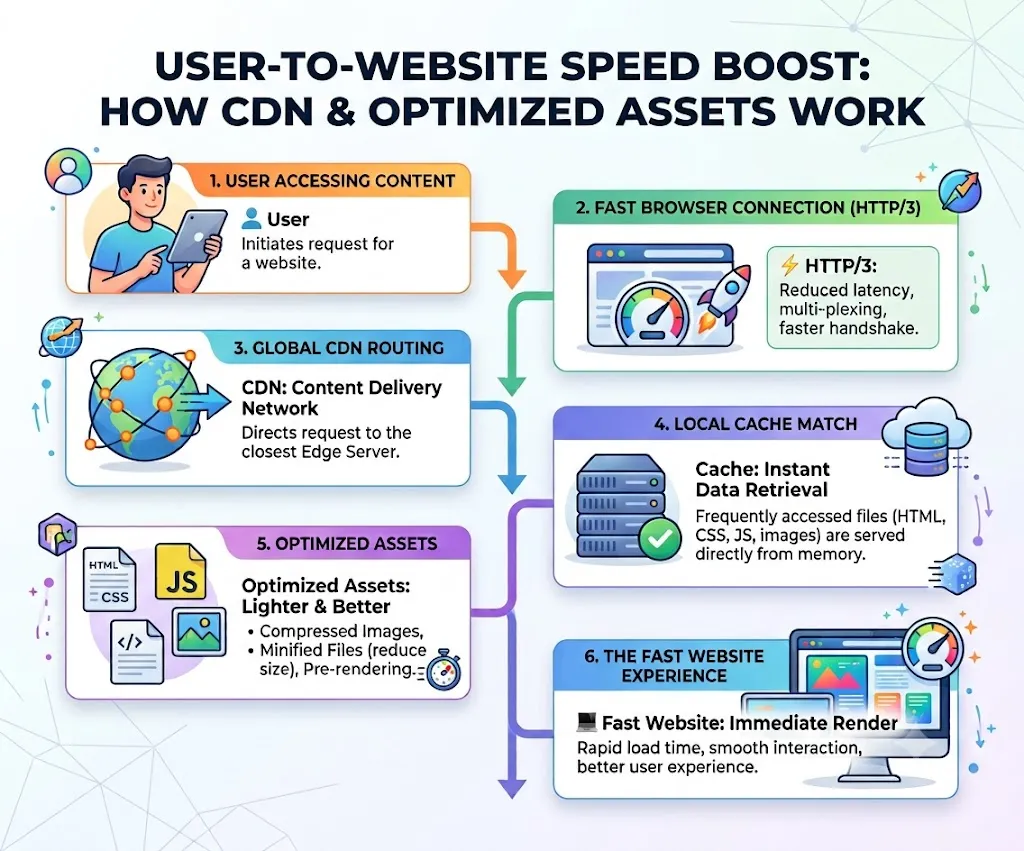
Popular Mobile Optimization Techniques
Developers use several methods to improve mobile performance:
- Responsive web design
- Mobile-friendly layouts
- Smaller image files
- Faster browser caching
- Reduced JavaScript
- Lazy loading
- Faster fonts
These improvements help websites load quickly, even on slower mobile networks. They also create a better experience for users who browse while traveling or using mobile data.
Fiber Optics Changed Internet Infrastructure
Website optimization is important, but internet infrastructure also plays a major role. Older internet connections relied on copper cables, which had limited speed and bandwidth. Fiber-optic technology changed that. Instead of using electrical signals, fiber cables send data through pulses of light. Light travels much faster and experiences less interference, which allows internet providers to deliver higher speeds with lower latency.
Benefits of Fiber Internet
| Feature | Advantage |
| High bandwidth | Supports faster downloads and uploads. |
| Low latency | Reduces delays during browsing. |
| Reliable connection | Maintains stable performance. |
| Better scalability | Supports growing internet demand. |
Artificial Intelligence Is Making the Web Even Faster
Artificial intelligence is shaping the future of web performance. Instead of relying only on manual optimization, AI systems can automatically analyze websites and identify performance issues, allowing developers to improve speed more quickly. AI can also predict user behavior and optimize content before users even request it.
For example, AI can predict which webpage a visitor is likely to open next. The browser or server can quietly prepare that content in advance, so when the visitor clicks the link, the page loads almost instantly. Many modern Content Delivery Networks (CDNs) also use AI to route traffic more efficiently and improve website reliability during busy periods. As AI continues to improve, it will become an even bigger part of web performance optimization.
The Role of 5G Technology
Faster mobile networks also changed how people use the web. Earlier mobile networks often struggled with large websites and streaming services. 5G introduced much higher speeds and lower latency, which made mobile browsing feel almost as fast as using a home broadband connection. 5G also supports cloud gaming, virtual reality, and real-time collaboration tools that depend on fast internet connections.
Edge Computing Brings Processing Closer to Users
Cloud computing improved hosting, but edge computing takes performance one step further. Instead of sending every request back to a central data center, edge computing processes some tasks closer to users. This reduces the distance data must travel, and as a result, websites respond more quickly. Many modern CDNs now include edge computing features that improve both speed and reliability.
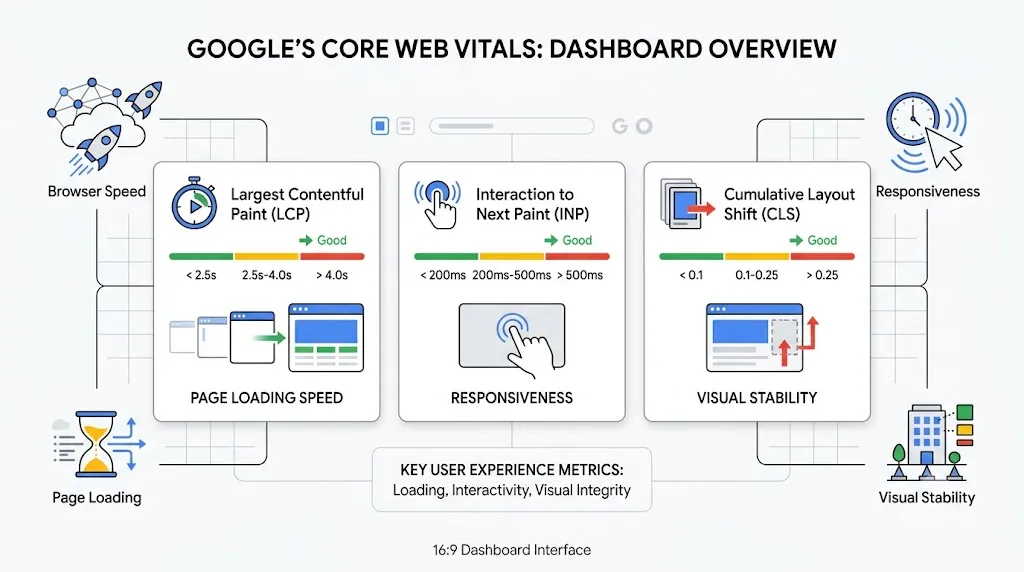
Core Web Vitals Changed How Speed Is Measured
Website speed is no longer measured by guesswork. Google introduced Core Web Vitals to help developers understand how real users experience a website. Instead of measuring only loading time, Core Web Vitals evaluate the complete user experience through three main metrics:
- LCP: Measures how quickly the main content appears.
- INP: Measures how responsive a page feels after user interaction.
- CLS: Measures visual stability during loading.
Together, these metrics encourage developers to build websites that feel fast, not just score well in technical tests. Google introduced Core Web Vitals to measure real user experience rather than only technical loading speed. These metrics focus on loading performance, responsiveness, and visual stability, helping website owners understand how visitors actually experience a page.
Expert Tip: Improving website speed isn’t just about buying faster hosting.
In real-world projects, the biggest performance gains usually come from reducing unnecessary JavaScript, optimizing images, enabling browser caching, and using a CDN together. Small improvements across multiple areas often outperform one major infrastructure upgrade.
Website speed also plays an important role in search engine optimization (SEO). While high-quality content remains the most important ranking factor, a fast website creates a better user experience. This can support stronger engagement and help search engines evaluate overall page quality.
Why These Innovations Still Matter
The technologies discussed in this guide did more than improve speed. They completely changed user expectations. Today, people expect websites to load almost instantly. They also expect videos to play without buffering and online tools to respond immediately.
For businesses, faster websites often lead to:
- Better user engagement
- Higher conversion rates
- More returning visitors
- Improved customer satisfaction
- Better search visibility
For developers, these innovations provide the foundation for building modern digital experiences. Every improvement builds on previous technologies, and together, they create the fast and reliable internet people use every day.
The Future of Web Speed
The web continues to evolve. Developers are already testing new technologies that could make websites even faster. Future browsers may automatically preload pages based on browsing habits, and artificial intelligence may optimize websites in real time without human intervention. As internet technology continues to improve, today’s fast websites may seem slow in just a few years.
Frequently Asked Questions
What are the biggest tech ideas that made the web move quicker?
Some of the most important innovations include broadband internet, HTTP/2, HTTP/3, Content Delivery Networks (CDNs), browser caching, image optimization, cloud computing, HTML5, fiber-optic internet, artificial intelligence, and edge computing.
Why are websites much faster today?
Websites are faster because browsers, servers, internet infrastructure, and development techniques have improved together. Faster protocols, smarter caching, and better hosting all reduce loading time.
How do CDNs improve website performance?
A CDN stores website content on servers around the world. Visitors receive files from the closest server, reducing latency and improving page speed.
Is HTTP/3 faster than HTTP/2?
Yes. HTTP/3 reduces connection delays and handles unstable networks more efficiently. It also improves mobile browsing by reducing latency.
Does faster internet always mean faster websites?
Not always. A fast internet connection helps, but website design also matters. Poor coding, large images, slow hosting, and unnecessary scripts can still make a website slow.
How does AI help improve website speed?
AI can optimize images, predict user behavior, improve caching, monitor performance, and automatically identify website bottlenecks before they affect visitors.
Conclusion
The internet didn’t become fast because of one breakthrough. It became faster because thousands of engineers, developers, researchers, and technology companies solved one performance challenge after another. From broadband internet and HTTP/2 to CDNs, browser caching, image optimization, cloud computing, fiber networks, and AI-powered optimization, every innovation has played a role in creating the web we rely on today.
From my own experience working with websites, one thing has become very clear: website speed is never about a single optimization. The biggest improvements usually come from combining multiple technologies and following modern best practices. I’ve seen websites become noticeably faster simply by optimizing images, enabling browser caching, using a CDN, and improving server response times. Small technical improvements often create a much better experience for real users.
The web will continue to evolve as AI, edge computing, faster internet infrastructure, and new web standards become more common. Understanding the technologies behind these improvements not only explains how today’s internet works but also helps developers, website owners, and anyone interested in technology build faster, more reliable online experiences in the years ahead.