Sound to Get Water Out of Phone: Does It Really Work?
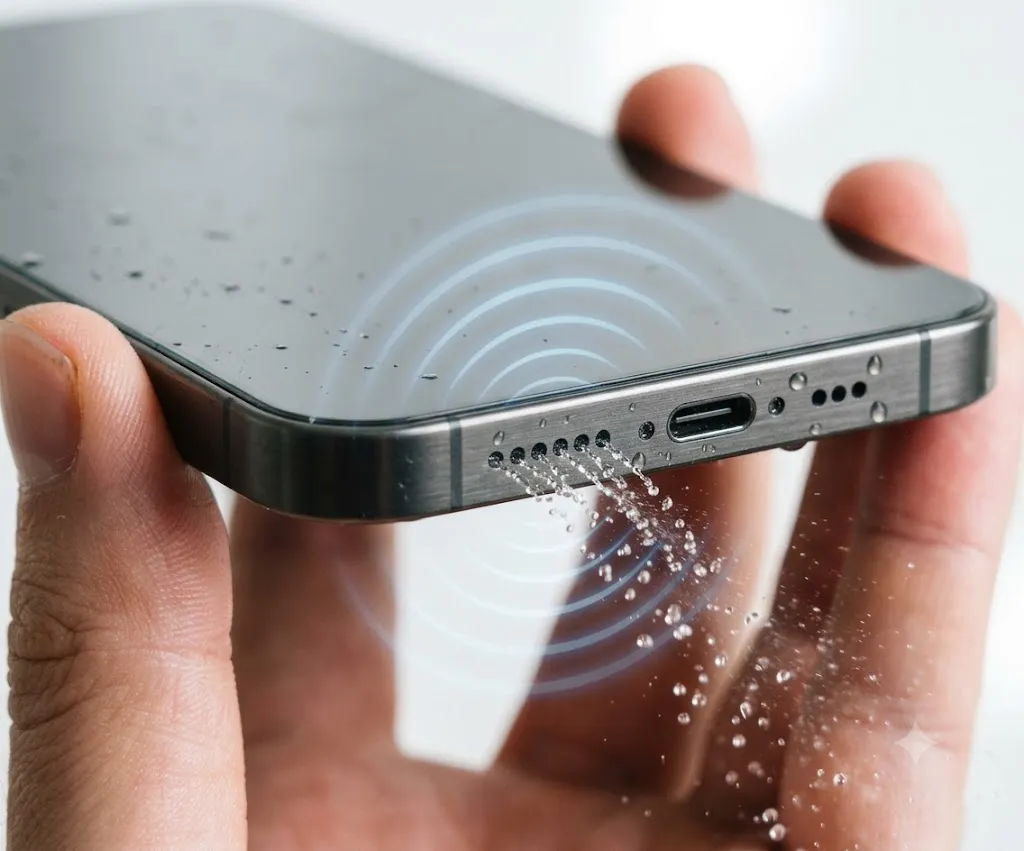
Have you ever dropped your phone in water or used it in heavy rain? If the speaker suddenly sounds quiet, muffled, or crackly, don’t panic in many cases, the problem is simply trapped water inside the speaker grille.
If your phone only sounds muffled but still turns on, there is a good chance the speaker simply has trapped water, and acting quickly can improve your chances of restoring normal sound before moisture settles deeper into the speaker assembly.
Playing a sound to remove water from your phone speaker is one of the most popular solutions. You may have seen videos, websites, or apps claiming that certain sound frequencies can push water out in just a few seconds, but does this method actually work, or is it just another internet myth?
Quick Answer: Yes, a sound to get water out of phone speakers can help remove small amounts of trapped water by creating low-frequency vibrations. It works best when water is only inside the speaker grille and has not damaged the phone internally. Most people see the best results by playing a water eject sound for 30 to 60 seconds with the speaker facing downward.
Can a Water Eject Sound Help? (At a Glance)
| Situation | Will It Help? |
| Speaker sounds muffled after rain | ✅ Yes |
| Phone fell into fresh water | ✅ Usually |
| Speaker crackles after splashes | ✅ Often |
| Charging port is wet | ❌ No |
| Phone won’t turn on | ❌ No |
| Saltwater exposure | ⚠️ Only partly |
| Internal water damage | ❌ No |
| Coffee or soda spill | ⚠️ Limited |
But, the good news is that a water eject sound can work after minor water exposure. Low-frequency vibrations help loosen water trapped near the speaker opening. Apple uses the same engineering principle in the Apple Watch, where turning off Water Lock plays tones that eject water from the speaker. While Apple has not introduced this feature on the iPhone, it shows that speaker vibrations can help remove trapped water under the right conditions.
However, this method has limits. It only helps remove water from the speaker area, and it cannot repair internal water damage or fix a phone that has stopped working because of liquid entering other components.
In this guide, you’ll learn how a water eject sound works, which frequencies are most effective, how to use the method safely, and what to do if your phone speaker still sounds muffled after trying it.
What Is Meant By a Sound to Get Water Out of a Phone?
A sound to get water out of phone speakers is a low-frequency audio tone designed to shake water droplets loose from the speaker grille, relying on sound vibrations instead of heat or physical tools.
Every smartphone speaker contains a thin diaphragm that moves back and forth to produce sound. Nearly all modern smartphones use a dynamic speaker driver, where the diaphragm moves air to create sound. When water becomes trapped around this driver or near the speaker opening, sound quality can temporarily become muffled until the moisture is removed.
When you play a low-frequency tone at a high volume, the diaphragm moves farther than it does with many higher-pitched sounds, and this stronger movement pushes air through the speaker opening.
As the air moves, it can break the surface tension holding small water droplets in place. Once the droplets loosen, gravity helps them fall out of the speaker if you hold the phone with the speaker facing downward.
This technique works best when:
The phone was exposed to fresh water. Water is trapped only in the speaker grille. The speaker still produces sound, but it is muffled or distorted.
It is important to understand that this method does not remove water trapped deep inside the phone. If liquid has reached the battery, display, charging port, or internal circuit board, sound alone cannot solve the problem.
How Does a Water Eject Sound Work?
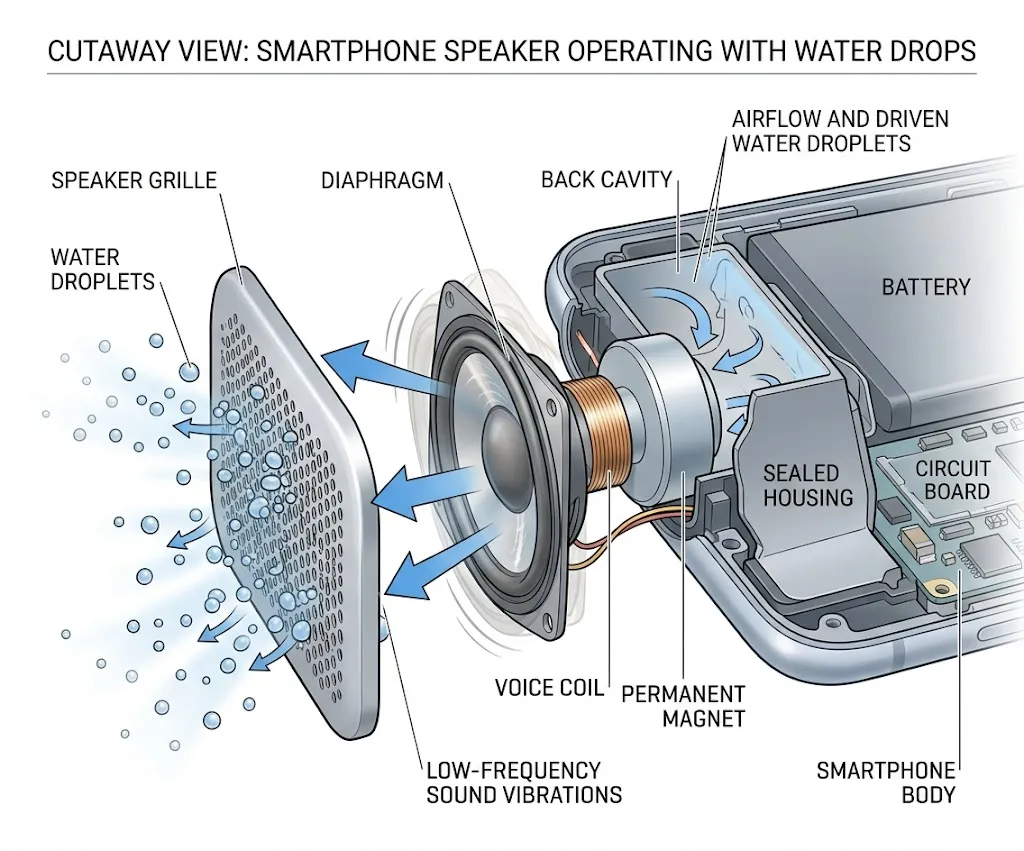
The science behind a water eject sound is simple. Your phone speaker creates sound by moving a tiny membrane, also called a speaker diaphragm, which pushes air forward and backward thousands of times every second.
Low-frequency sounds make this diaphragm travel farther with each movement, and that larger movement creates stronger bursts of air around the speaker grille.
This movement also creates rapid changes in air pressure around the speaker opening. Combined with vibration, these pressure changes help push tiny water droplets toward the outside of the speaker grille.
When water becomes trapped inside the speaker mesh, it sticks because of surface tension, which acts like a thin elastic layer that keeps tiny droplets attached to the metal mesh.
The repeated air movement produced by low-frequency sound weakens that surface tension. As the droplets start moving, gravity helps pull them out of the speaker opening. This is why experts usually recommend placing the phone with the speaker facing downward while playing the sound.
Although many people refer to a single “magic frequency,” there is no universal number that works for every phone, since different smartphones use different speaker sizes, acoustic chambers, enclosures, and internal designs.
The acoustic chamber inside a smartphone helps amplify sound produced by the speaker. Because each manufacturer designs this chamber differently, two phones playing the same frequency may eject water with slightly different effectiveness.
That said, many water eject tools focus on frequencies around 165 Hz because they often produce strong speaker movement on modern smartphones. Some tools also sweep through a range of frequencies instead of using just one tone, which increases the chance of matching the natural response of different speaker designs.
Why Does Water Make Your Phone Speaker Sound Muffled?
When water gets inside the speaker grille, it changes the way sound travels. Instead of moving freely through the air, the speaker has to push against tiny water droplets covering the speaker opening, which reduces the amount of sound that reaches your ears.
As a result, your phone may sound:
Muffled Quieter than usual Crackly or buzzing Distorted during music or calls Less clear than before
In most cases, the speaker itself is not damaged, the trapped water simply blocks normal sound movement, and once the droplets are removed, the speaker usually returns to its normal sound quality.
Does the Sound to Get Water Out of the Phone Really Work?
Yes, it can work, but only under the right conditions. If your phone speaker sounds muffled after getting splashed with water, a low-frequency water eject sound may help remove small droplets trapped near the speaker grille, and many users report clearer audio after playing these sounds for 30 to 60 seconds.
The idea is not just based on user experiences. Apple uses a similar concept in the Apple Watch: after Water Lock is turned off, the watch plays a series of tones that vibrate the speaker and push water out of the opening.
Best Frequency to Remove Water from Phone Speakers
Many people ask the same question after getting their phone wet: what is the best sound to get water out of phone speakers?
The answer is that there is no single frequency that works for every phone. Different smartphone models have different speaker sizes, speaker chambers, and internal designs, so one frequency may work better on one device than another. Still, some frequencies have become more popular because they produce stronger speaker movement.
165 Hz
Around 165 Hz is the most commonly recommended frequency for removing water from phone speakers. At this frequency, many smartphone speakers create enough diaphragm movement to help push trapped water toward the speaker opening, which is why many speaker-cleaning websites and water eject tools use 165 Hz as their default setting.
Around 165 Hz creates strong speaker movement on many smartphones, making it one of the most commonly used frequencies for water ejection. While it is not the official frequency for every phone model, it often produces enough vibration to help loosen water trapped near the speaker grille. Because every smartphone has a different speaker design, 165 Hz should be viewed as a reliable starting point rather than a universal solution.
Frequency Sweeps
Some tools do not use one fixed tone. Instead, they play a frequency sweep, usually between 50 Hz and 500 Hz, which gradually changes from one tone to another. Frequency sweeps move through multiple tones, increasing the chance of matching different speaker designs. For this reason, many modern water eject tools prefer a frequency sweep over a single tone.
Other Frequencies
You may also find tools that use:
65 Hz 100 Hz 150 Hz 200 Hz 250 Hz
These frequencies may also remove water from some speakers, although there is little evidence that one of them is always better than another. The most effective choice depends on:
Your phone model The amount of trapped water The location of the water The speaker design
Instead of searching for the “perfect” frequency, it is usually better to use a trusted water eject sound and repeat the process if needed.
Before You Play a Water Eject Sound
Before starting, take a few simple precautions:
✓ Disconnect Bluetooth devices.
✓ Remove the phone case if it covers the speaker.
✓ Do not connect a charger.
✓ Dry the outside of the phone with a microfiber cloth.
✓ Hold the speaker facing downward.
These small steps improve your chances of removing trapped water safely.
How to Use a Sound to Get Water Out of Your Phone
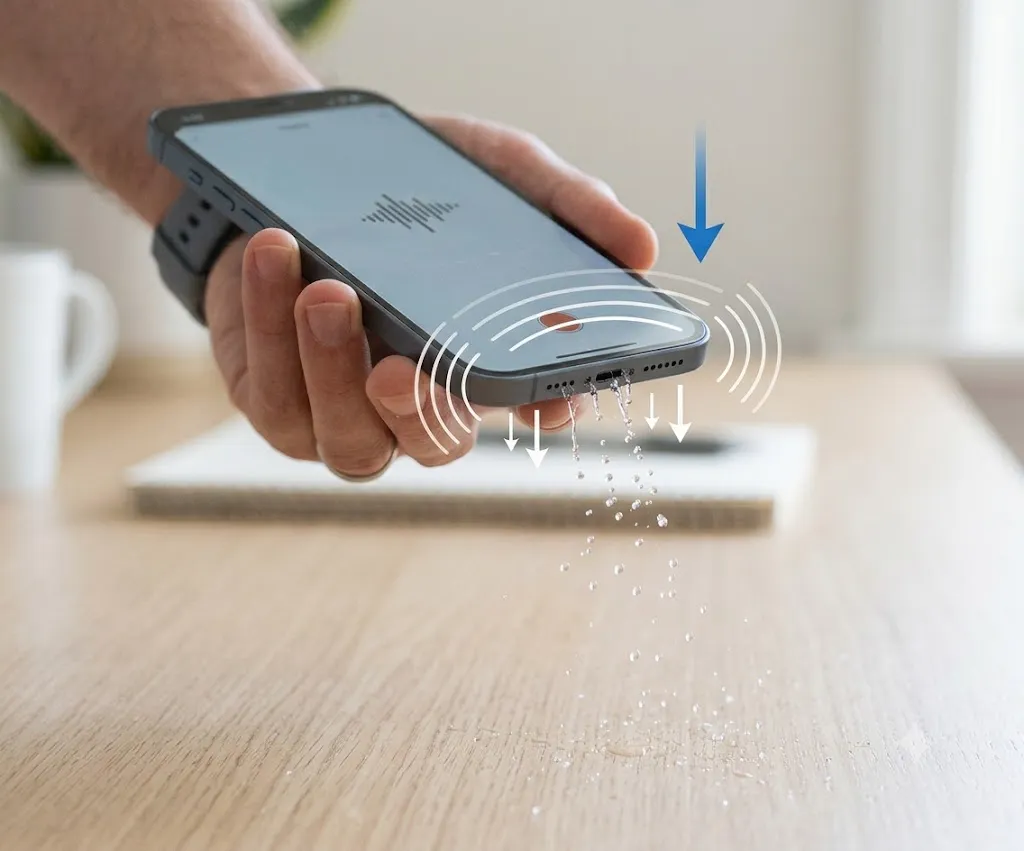
Using a water eject sound only takes a few minutes, and following the correct steps improves your chances of clearing the speaker without causing more problems.
Step 1: Remove Any Bluetooth Connections
Before playing the sound, disconnect:
Wireless earbuds Bluetooth speakers Smartwatches connected for audio
Otherwise, the sound may play through another device instead of your phone speaker.
Step 2: Turn the Volume Up
Set your phone volume to the highest safe level, since higher volume creates stronger speaker movement, and stronger movement produces more airflow, which helps push water out of the speaker grille.
Step 3: Hold Your Phone Correctly
Position the phone so the speaker faces downward. This allows gravity to help the water leave the speaker opening while the sound creates vibrations. Avoid laying the phone flat on a table during the process.
Step 4: Play the Water Eject Sound
Play a low-frequency water eject sound for about 30 to 60 seconds. If your phone was only lightly splashed, one cycle may be enough, but if more water enters the speaker, you can repeat the process two or three times.
Step 5: Test the Speaker
After the sound finishes:
Play music. Watch a video. Listen to a voice recording.
If the speaker sounds clear again, the water has likely been removed. If it still sounds muffled, wait about 20 to 30 minutes and try another cleaning cycle.
Best Phone Position During Water Removal
The way you hold your phone can make a noticeable difference. The best position is:
Speaker pointing downward Phone slightly tilted Charging port also facing down if possible
This allows gravity to work with the sound vibrations instead of against them. Many people accidentally hold the phone with the speaker facing upward, and in that position, water has nowhere to go, making the cleaning process less effective.
If your phone has two bottom speakers, keep the entire bottom edge facing the ground, and avoid shaking the phone aggressively — gentle handling is enough.
How Long Should You Play the Sound?
Most phones only need 30 to 60 seconds of playback. If the speaker still sounds blocked, repeat the process instead of playing the sound continuously for several minutes. A simple guide is:
| Water Exposure | Recommended Playback |
| Light splash | 30 seconds |
| Rain or moisture | 30–60 seconds |
| Phone dropped in clean water | 60 seconds, repeated 2–3 times |
| Salt water or sugary drinks | Do not rely on sound alone. Clean the device properly and seek professional help if needed. |
Repeating several short cycles is generally more effective than one long session.
What to Expect After Playing the Sound?
| Time | Expected Result |
| Immediately | Water droplets begin moving. |
| 30–60 seconds | Speaker often sounds clearer. |
| 20–30 minutes | Remaining moisture may evaporate naturally. |
| After 2–3 cycles | Most minor speaker moisture is gone. |
| After several hours with no improvement | Internal damage may be present. |
Does It Work on Every Type of Liquid?
Water eject sounds work best after exposure to clean, fresh water, since other liquids can leave behind residue that sound vibrations cannot remove.
If your phone was exposed to salt water or sugary drinks, remove any visible residue according to the manufacturer’s guidance before relying on a water eject sound. If the speaker continues to sound distorted, professional service may be necessary.
Salt water can leave behind mineral deposits even after the water evaporates, and these deposits may lead to corrosion over time, which is why manufacturers recommend rinsing compatible devices with fresh water after saltwater exposure and allowing them to dry completely.
Common Mistakes to Avoid
Many people accidentally reduce the effectiveness of the water eject sound by making simple mistakes.
Using Low Volume
Low volume creates weaker speaker movement, and without enough vibration, trapped water may stay inside the speaker.
Charging the Phone Immediately
Never charge a wet phone. If water has entered the charging port, connecting a charger could increase the risk of damage, so allow the phone to dry first.
Using a Hair Dryer
Hot air may seem helpful, but it can damage adhesives and force moisture deeper into the phone. Avoid using hair dryers or heat guns.
Putting the Phone in Rice
Rice is one of the oldest phone-drying myths. Apple specifically advises against placing an iPhone in rice because small rice particles can enter the device and potentially cause additional problems. While rice may absorb some moisture from the air, it does very little to remove water trapped inside the speaker, and small rice particles or dust can also become stuck in the speaker grille or charging port.
Ignoring Salt Water
Water eject sounds work best after exposure to fresh water. If your phone fell into:
Ocean water Pool water with chemicals Coffee Tea Juice Soda
The liquid can leave behind minerals or sticky residue. In these situations, sound alone is usually not enough, and the phone may need proper cleaning to prevent corrosion.
How to Prevent Water From Getting Trapped Again?
Although no phone is completely waterproof, a few simple habits can reduce the chance of muffled speakers after water exposure:
- Dry your phone with a soft microfiber cloth after rain or swimming.
- Keep the speaker openings facing downward for a few seconds after contact with water.
- Avoid exposing the phone to salt water whenever possible.
- Rinse compatible devices with fresh water after saltwater exposure, following the manufacturer’s guidance.
- Use a protective case if you frequently use your phone near water.
Does a Sound to Get Water Out of a Phone Work on Every Device?
Yes, this method can work on most modern smartphones with built-in speakers, although the results are not the same for every device.
Every phone has a different speaker design, and some speakers move more air than others. As a result, one phone may clear water after one cleaning cycle, while another may need several attempts. The good news is that the basic principle stays the same: low-frequency sound creates vibrations that help push water away from the speaker opening.
Does It Work on an iPhone?
Yes. Many iPhone users play water eject sounds after dropping their phone in water or using it in heavy rain.
Although iPhones do not include a built-in water eject feature, Apple uses the same concept on the Apple Watch, which plays sound vibrations to remove water after Water Lock is turned off. If your iPhone speaker sounds muffled after getting wet, a water eject sound may help restore normal audio.
Tip for iPhone users: If your iPhone displays a “Liquid Detected” warning when charging, avoid forcing the device to charge, and let the charging port dry naturally before connecting a cable. A water eject sound is designed to clear the speaker only if it will not remove moisture from the charging port.
Apple devices also include a Liquid Contact Indicator (LCI) inside the phone. Apple technicians use this indicator to determine whether the device has been exposed to liquid, even if it appears dry from the outside.
Also, the same method works on Android phones because their speakers use the same basic technology. Many users successfully use water eject sounds on devices from:
Samsung Galaxy Google Pixel Motorola OnePlus Xiaomi OPPO vivo Nothing Phone
The exact frequency that works best may vary between models, which is why many online tools use a frequency sweep instead of one fixed tone.
Can You Use a Water Eject Sound on Other Devices?
Yes, although the results depend on the speaker design. These sounds may also help remove small amounts of moisture from:
Wireless earbuds Bluetooth speakers Tablets Smartwatches Laptop speakers
The same basic method applies: play the sound through the affected speaker at a high volume while keeping the speaker opening facing downward so gravity can help remove the moisture.
Can Water Get Into Waterproof Phones?
Yes. Water-resistant phones are designed to survive accidental exposure to water, but their speakers still have open grilles so sound can travel freely. Because of this, small amounts of water can collect around the speaker after rain, swimming, or accidental splashes.
Even if your phone has an IP67 or IP68 water-resistance rating, water can still temporarily collect around the speaker openings after splashes or rain.
Speaker Water vs. Internal Water Damage
This is one of the most important things to understand. A water eject sound can only remove water near the speaker opening, and it cannot repair damage inside the phone. The table below explains the difference.
| Speaker Water | Internal Water Damage |
| Muffled sound | Phone will not turn on |
| Crackling audio | Screen flickers |
| Lower volume | Camera lens fogs up |
| Distorted music | Charging problems |
| Speaker still works | Random restarts |
| Usually improves with drying | Often requires repair |
If your phone still works normally except for poor speaker quality, trapped water in the speaker is the most likely cause. However, if several functions stop working after water exposure, the problem may be much more serious.
When You Should Not Use a Water Eject Sound
A water eject sound is designed for trapped speaker moisture only.
Skip this method and consider professional repair if:
- your phone will not turn on,
- the display flickers,
- the battery overheats,
- the charging port shows corrosion,
- the speaker makes no sound at all,
- liquid has entered after a long period underwater.
In these situations, internal components may already be damaged, and playing sound will not solve the problem.
What If Your Speaker Still Sounds Muffled?
Sometimes the sound improves immediately, and other times it takes a little longer. If your speaker still sounds muffled after using a water eject sound, try these steps.
Wait Before Trying Again
Small droplets may slowly move toward the speaker grille, so wait about 30 minutes before running another cleaning cycle.
Repeat the Process
Many phones need two or three cleaning cycles, especially after heavy rain or a brief drop into clean water.
Check the Volume
Make sure the volume was set high enough, since weak speaker movement may not generate enough airflow to remove trapped water.
Remove Any Phone Case
Some thick protective cases partially cover the speaker opening, and removing the case allows water to leave more easily.
Test Different Audio
Play:
Music Voice recordings Videos Phone calls
Sometimes only certain frequencies sound distorted, so testing different audio helps determine whether the speaker has fully recovered.
What Not to Do
Many online tips are outdated or simply do not work. Avoid these mistakes.
Do Not Use High Heat
Hair dryers, ovens, and heat guns can damage seals, adhesives, and internal parts. Natural drying is much safer.
Do Not Insert Objects Into the Speaker
Avoid using:
Needles Toothpicks Cotton swabs Pins
These objects can damage the speaker mesh or push debris deeper inside.
Do Not Shake the Phone Aggressively
A gentle tilt is enough, since violent shaking may spread water to other parts of the device.
Do Not Expect Instant Results
Sometimes water needs time to leave the speaker, and running another cleaning cycle after a short wait is often more effective than repeating it continuously.
If you’re troubleshooting your smartphone, you may also want to learn how to keep your phone screen on while reading instructions or using navigation apps.
Frequently Asked Questions
What sound gets water out of a phone?
Low-frequency sounds between about 50 Hz and 500 Hz are commonly used. Many water eject tools focus on 165 Hz or use a frequency sweep across this range.
What is the best frequency to remove water from phone speakers?
There is no single best frequency for every phone, although around 165 Hz is one of the most widely used because it creates strong speaker movement on many smartphones.
How long should I play the sound?
Play the sound for 30 to 60 seconds. If the speaker still sounds muffled, repeat the process after waiting for about 30 minutes.
Can I damage my phone by playing a water eject sound?
No. Playing low-frequency sound at normal maximum volume is generally safe for a working smartphone speaker.
Does it remove water from the charging port?
No. A water eject sound is designed to clear water from the speaker, and it cannot remove water trapped inside the charging port.
Does it work after salt water exposure?
It may remove some liquid from the speaker, but salt leaves behind minerals that can cause corrosion. If your phone was exposed to seawater, rinse it according to the manufacturer’s guidance (if appropriate for your device) and seek professional service if problems continue.
Is rice better than using a water eject sound?
No. Rice may absorb moisture from the surrounding air, but it does not actively remove water trapped inside the speaker. A water eject sound is designed specifically to move water away from the speaker opening.
Final Verdict
If your phone speaker sounds muffled after getting wet, using a sound to get water out of phone speakers is one of the safest and easiest troubleshooting methods to try first. When water is trapped only inside the speaker grille, low-frequency vibrations can often help remove water from the phone speaker and restore clearer audio. Based on manufacturer guidance, the way smartphone speakers are designed, and how water eject technology works on devices like the Apple Watch, this method is technically sound for minor speaker moisture. It is a practical first step before considering more expensive repair options.
At the same time, it is important to keep realistic expectations. A water eject sound is not a repair tool. It cannot remove water from the charging port, reverse corrosion, or fix internal liquid damage affecting the battery, motherboard, or display. If your phone shows signs such as charging errors, random shutdowns, display issues, or complete speaker failure, professional inspection is usually the safest choice. The biggest lesson is to act early. Dry the outside of the phone, avoid charging it while wet, hold the speaker facing downward, and run a trusted water eject sound for 30 to 60 seconds. In many everyday cases, these simple steps are enough to restore normal speaker performance without causing further damage.
Looking for more simple online tools? You can also try our small font generator to create stylish text for social media, gaming profiles, and messaging apps.